> ## Documentation Index
> Fetch the complete documentation index at: https://docs.thedecard.com/llms.txt
> Use this file to discover all available pages before exploring further.
# Sumsub Token Sharing
> If you already use Sumsub as your compliance vendor, token sharing lets you reuse the verification data you have already collected with DCS, so your users do not have to verify twice. This page covers the two sharing modes (agreed offline, not API fields), the two integration directions for a data provider and a data recipient, and how to pass kycInfo.sumsubShareToken when applying for a card.
## 📄 Guide
If you already use [Sumsub](https://sumsub.com) as your compliance (identity verification) vendor, you can share the verification data you have collected with DCS through Sumsub's **Sharing Partners** mechanism. This simplifies KYC, because end users do not have to complete identity verification a second time on the DCS side.
Once integration is complete, you pass a Sumsub **share token** in the card application request (field `kycInfo.sumsubShareToken`). DCS uses that token to fetch and reuse the user's verification data from Sumsub, and the application then continues through the rest of KYC review.
> Sumsub token sharing must be configured once in **each of the two environments, sandbox (UAT) and production (PROD)**. A sandbox token cannot be used in production and vice versa, so always confirm that the environments match when configuring.
## Two integration directions
Depending on who collects the verification data and who reuses it, there are two directions in which the token is added between you and DCS. Follow the steps that match your actual role.

 ### configure the sharing direction that matches your role
**If you are the data provider** (you collect the verification data and share it with DCS):
1. Obtain the UAT and PROD partner tokens from your DCS contact.
2. On your Sumsub platform, go to **Sharing Partners** (see the [Sumsub documentation](https://docs.sumsub.com/docs/manage-sharing-partners)) and add the token as prompted.
3. Verify with your DCS contact: the name you registered with Sumsub should now be visible on the DCS Sumsub platform.
### configure the sharing direction that matches your role
**If you are the data provider** (you collect the verification data and share it with DCS):
1. Obtain the UAT and PROD partner tokens from your DCS contact.
2. On your Sumsub platform, go to **Sharing Partners** (see the [Sumsub documentation](https://docs.sumsub.com/docs/manage-sharing-partners)) and add the token as prompted.
3. Verify with your DCS contact: the name you registered with Sumsub should now be visible on the DCS Sumsub platform.
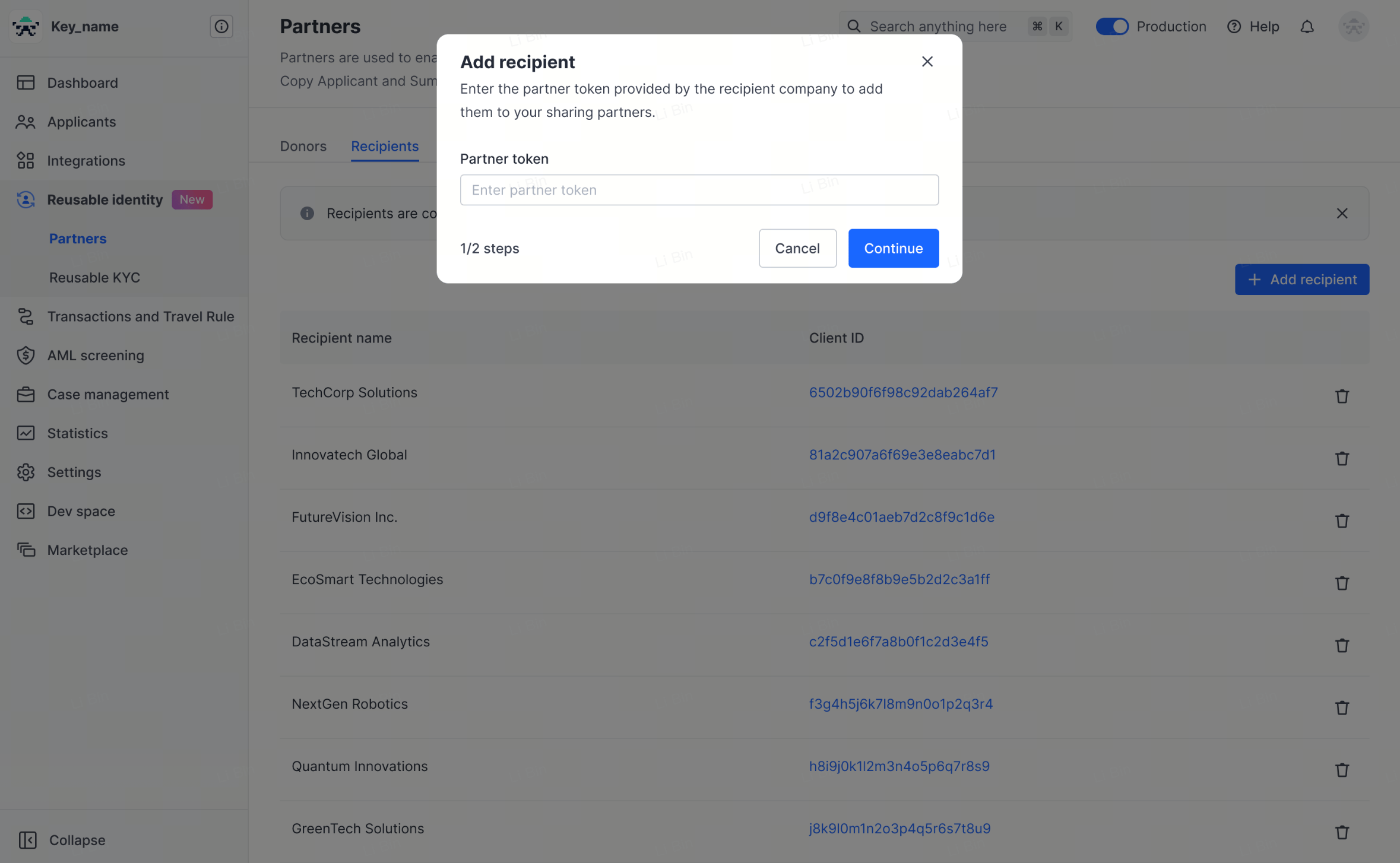 **If you are the data recipient** (DCS collects the verification data and shares it with you, or you need to give DCS your token):
1. Obtain your UAT and PROD tokens on your Sumsub platform and share them with your DCS contact.
2. After DCS has added them, confirm on your Sumsub platform that DCS appears in the **Donor list**, and let DCS know the result.
**If you are the data recipient** (DCS collects the verification data and shares it with you, or you need to give DCS your token):
1. Obtain your UAT and PROD tokens on your Sumsub platform and share them with your DCS contact.
2. After DCS has added them, confirm on your Sumsub platform that DCS appears in the **Donor list**, and let DCS know the result.
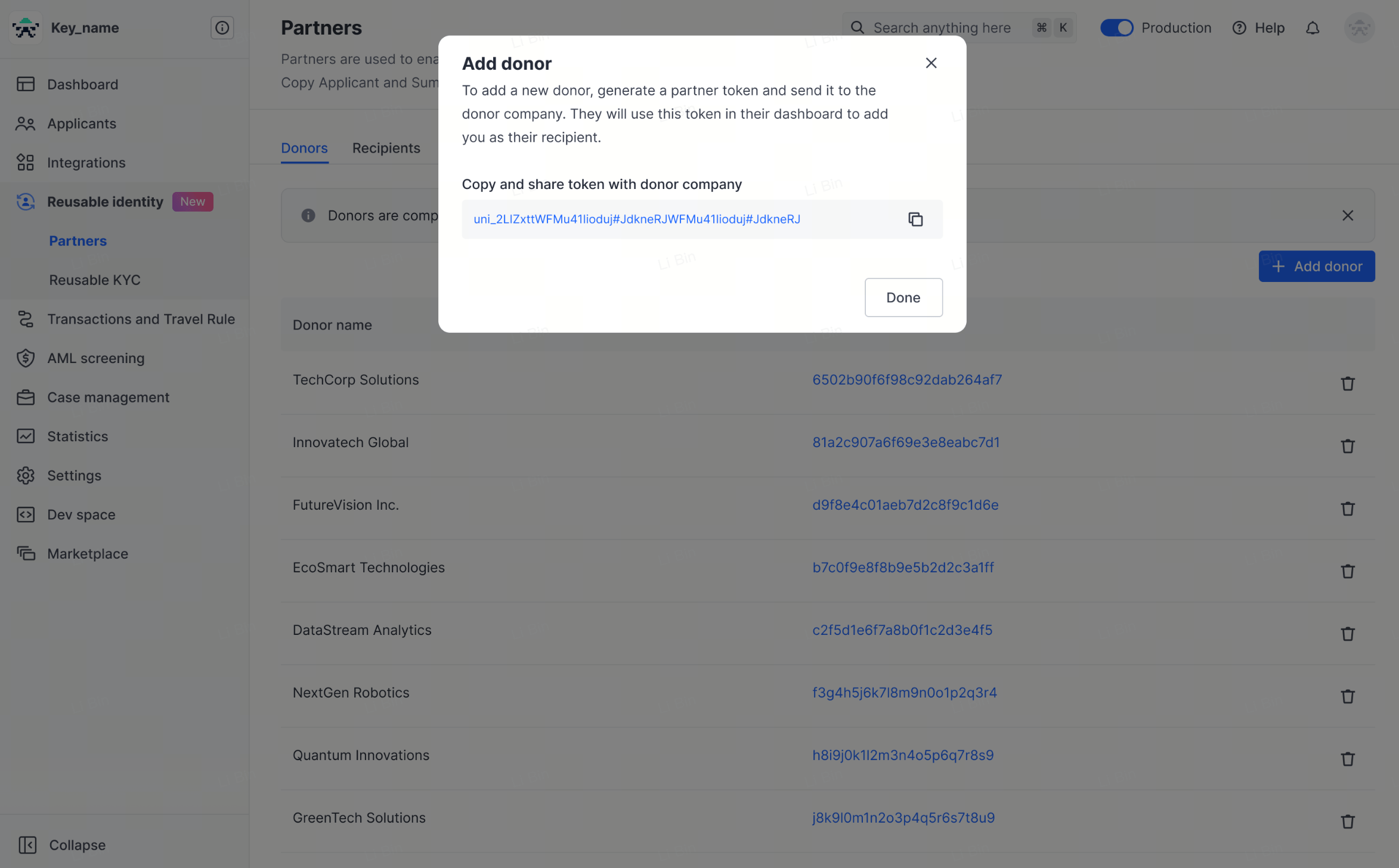 ### Step 3: generate the share token
Generate a share token for the target applicant on the Sumsub side. A share token looks like `_act-sbx-***` (sandbox) or `_act-***` (production); these are **illustrative only, so never write a real token anywhere**.
> Sumsub share tokens are normally single-use, so generate a new token for every application you submit. The environment (sandbox or production) must match the DCS environment you are currently integrating with.
### Step 4: use the share token in a card application request
In the virtual card application request POST `/card/v1/virtual-card/apply`, put the generated share token in `kycInfo.sumsubShareToken`.
| Field | Type | Required | Constraint | Description |
| -------------------------- | ------ | -------- | ------------------ | --------------------------------------------------------------------------------- |
| `kycInfo.sumsubShareToken` | string | Yes | Max 500 characters | Sumsub share token; DCS uses it to reuse the user's verification data from Sumsub |
**There is no mode field in `kycInfo`**: within the card application body, `sumsubShareToken` is the only Sumsub-token-related field. There is **no** mode enum (such as `kycSubmitMode` or `sumsubShareTokenMode`) — the sharing relationship is decided by the Sharing Partners configuration in Sumsub and by your contract, and is never carried in the request body.
Besides `sumsubShareToken`, `kycInfo` must also carry data that is not fetched from Sumsub, such as `email`, the POA fields `poaDocType` / `poaDocUrlList` / `poaDocDate` / `addressLine1` / `city` / `country`, and the employment and source-of-funds fields `employmentStatus` / `occupation` / `sourceOfFunds` / `sourceOfWealth`. The card application endpoint specification is authoritative for the complete field list.
## Sample request fragment (masked)
> Every value in the `kycInfo` fragment below is a placeholder. **Never write real user PII (phone number, email, identity document, address) or a real token.**
```json theme={null}
{
"externalUserId": "",
"categoryId": 0,
"applyRef": "",
"kycInfo": {
"sumsubShareToken": "_act-sbx-***",
"email": "user@example.com",
"occupation": "",
"sourceOfFunds": ""
}
}
```
## Sandbox testing: generate a simulated KYC token
During sandbox (UAT) integration testing, if you do not yet have a working real Sumsub share token, you can call the **simulated token endpoint** provided by DCS to generate a test token:
POST `/simulation/v1/generate-kyc-token`
| Parameter | Type | Required | Description |
| ---------------- | ------ | -------- | ---------------- |
| `externalUserId` | string | Yes | External user ID |
The response envelope is always `{ code, message, messageDetail, data }` (there is no `success` boolean), and the simulated token is returned in `data.token`. Note that `messageDetail` is an object (`message` / `title` / `type` / `icon` / `action` / `linkTitle` / `linkUrl`, all empty on a normal success) rather than `null`:
```json theme={null}
{
"code": "",
"message": "",
"messageDetail": {
"message": "",
"title": "",
"type": "",
"icon": "",
"action": "",
"linkTitle": "",
"linkUrl": ""
},
"data": {
"token": ""
}
}
```
**This token is for simulation and sandbox use only.** It is a different thing from a real Sumsub share token in production, so do not mix the two and never use it in production.
## Troubleshooting
If Sumsub token sharing is not working as expected, work through these common causes:
| Problem | Symptom | Diagnosis and fix |
| ------------------------------------------ | ------------------------------------------------------------------------------- | ------------------------------------------------------------------------------------------------------------------------------------------------------------------------------------------------------------------------------------------------------------------------------------------------------------------------------------------------------------------------------- |
| Token already used | After the application is submitted, the token is reported as invalid or expired | Sumsub share tokens are **single-use only**. Generate a fresh share token for the same applicant for every new card application, and never reuse an old one. |
| Sandbox and production mismatch | The token works in one environment but is rejected in the other | The environment in which you generated the token in Sumsub (sandbox or production) must match the DCS environment you are integrating with. A sandbox token cannot be used against DCS production, and vice versa. When switching environments, check the environment indicator at the bottom of the Sumsub dashboard (a yellow banner means sandbox mode). |
| Required fields missing on the Sumsub side | The KYC application fails to be created, or the review is sent back | If the applicant record on your Sumsub side is missing fields that DCS requires (name, date of birth, nationality, address, and so on), DCS cannot complete the review. **Ask DCS in advance for the list of fields your Program requires on the Sumsub side**, and make sure every one of them is fully populated in the applicant record before you generate the share token. |
> If none of the above resolves the issue, contact DCS technical support with the exact error message and the time it occurred.
## The Sumsub POI / POA configuration baseline (required reading)
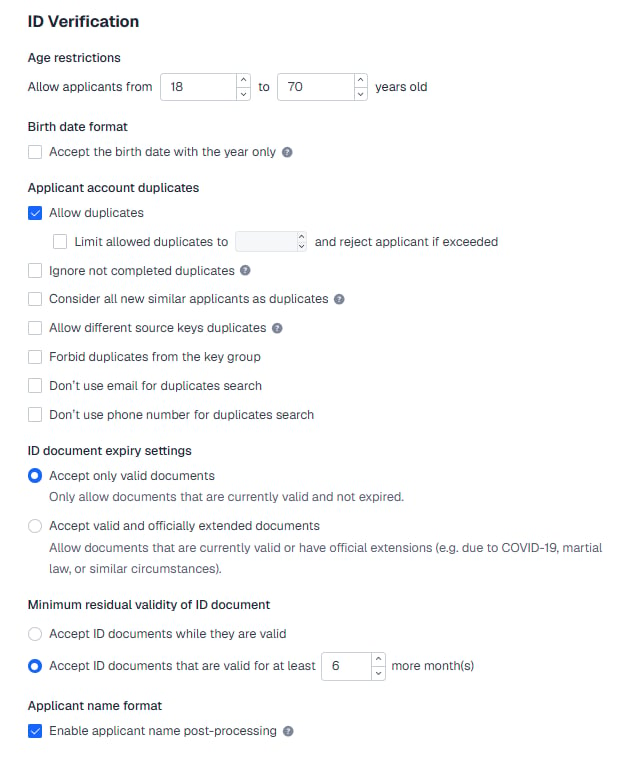
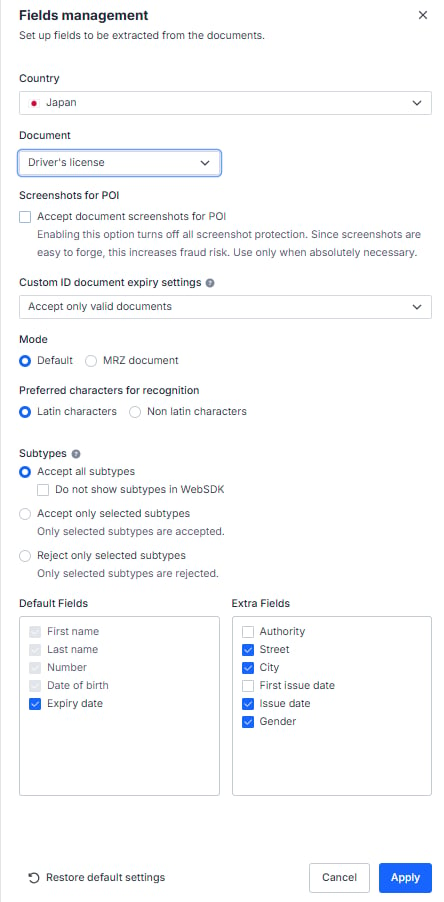
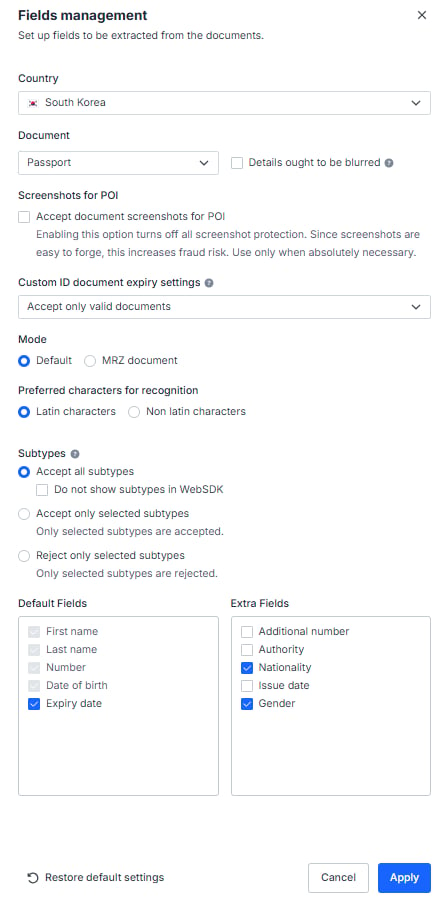
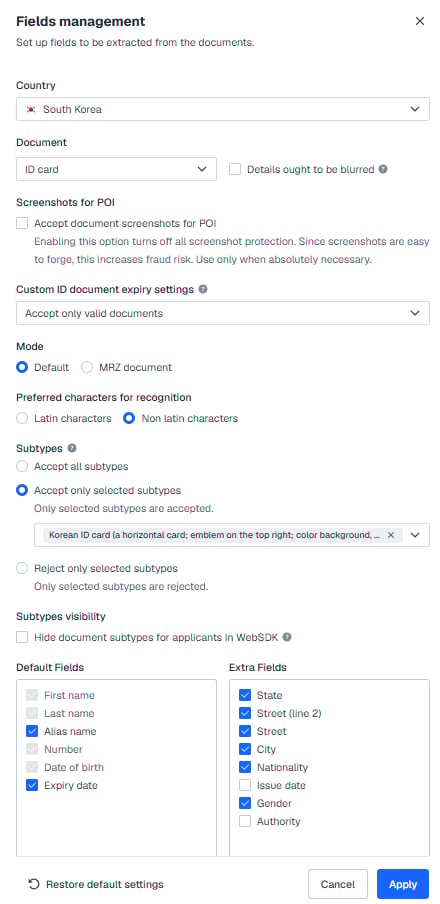
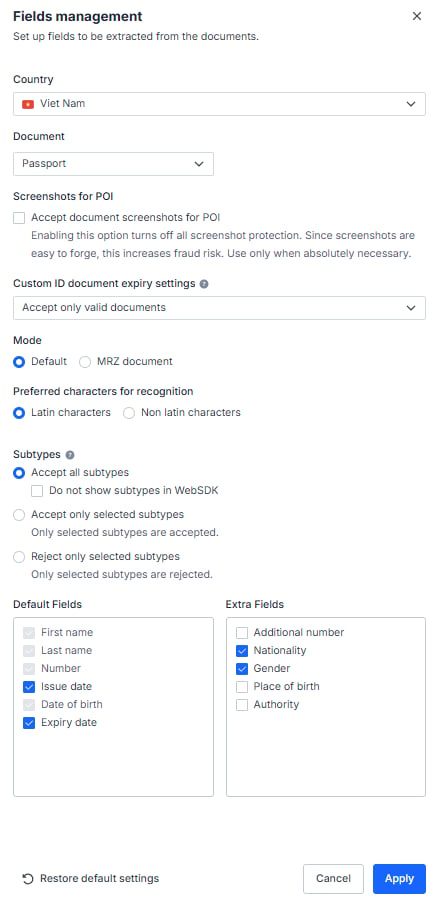
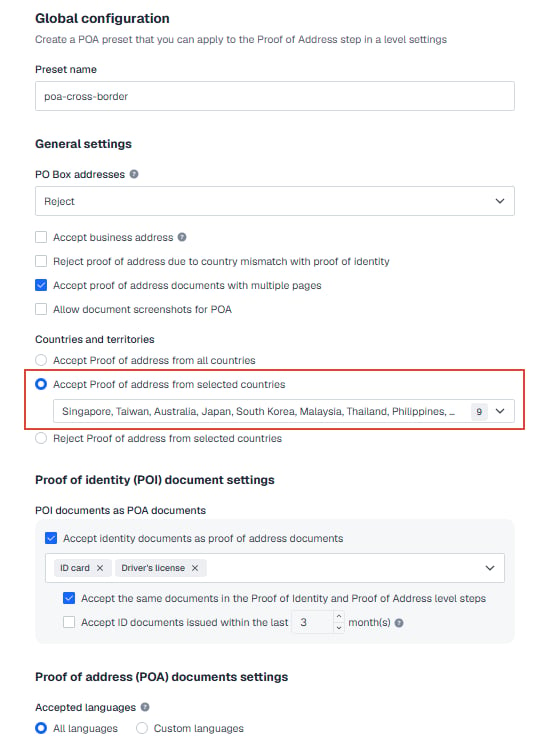
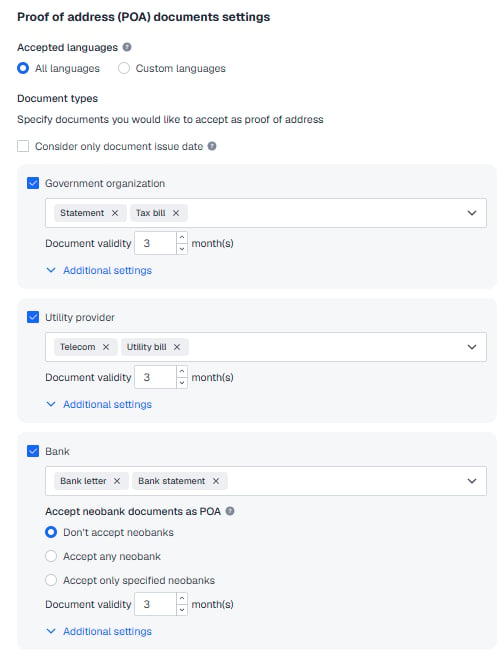
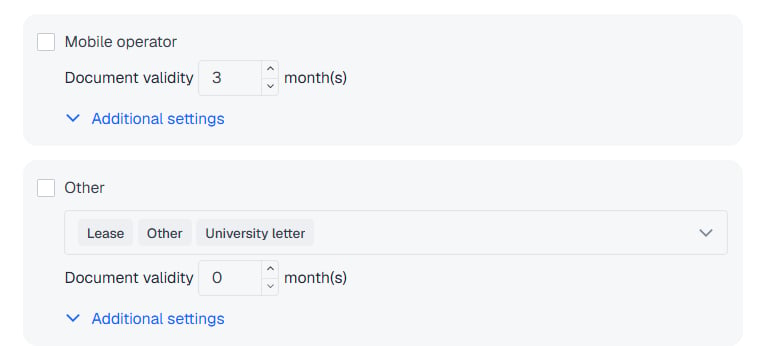
for the Sumsub token you send to DCS to pass verification, your POI (proof of identity) and POA (proof of address) configuration in the Sumsub console **must match DCS exactly**. Follow the screenshots below closely; a mismatched configuration will cause the token to fail verification and will hold up your launch.
This baseline may be adjusted from time to time as compliance or regulatory requirements change, so DCS's latest notice always prevails. For the table of accepted document types by country and when an additional POA is required, see [About KYC Documents](./kyc-documents).
### Part 1: Setting for POI (proof of identity)
#### 1. ID Verification
### Step 3: generate the share token
Generate a share token for the target applicant on the Sumsub side. A share token looks like `_act-sbx-***` (sandbox) or `_act-***` (production); these are **illustrative only, so never write a real token anywhere**.
> Sumsub share tokens are normally single-use, so generate a new token for every application you submit. The environment (sandbox or production) must match the DCS environment you are currently integrating with.
### Step 4: use the share token in a card application request
In the virtual card application request POST `/card/v1/virtual-card/apply`, put the generated share token in `kycInfo.sumsubShareToken`.
| Field | Type | Required | Constraint | Description |
| -------------------------- | ------ | -------- | ------------------ | --------------------------------------------------------------------------------- |
| `kycInfo.sumsubShareToken` | string | Yes | Max 500 characters | Sumsub share token; DCS uses it to reuse the user's verification data from Sumsub |
**There is no mode field in `kycInfo`**: within the card application body, `sumsubShareToken` is the only Sumsub-token-related field. There is **no** mode enum (such as `kycSubmitMode` or `sumsubShareTokenMode`) — the sharing relationship is decided by the Sharing Partners configuration in Sumsub and by your contract, and is never carried in the request body.
Besides `sumsubShareToken`, `kycInfo` must also carry data that is not fetched from Sumsub, such as `email`, the POA fields `poaDocType` / `poaDocUrlList` / `poaDocDate` / `addressLine1` / `city` / `country`, and the employment and source-of-funds fields `employmentStatus` / `occupation` / `sourceOfFunds` / `sourceOfWealth`. The card application endpoint specification is authoritative for the complete field list.
## Sample request fragment (masked)
> Every value in the `kycInfo` fragment below is a placeholder. **Never write real user PII (phone number, email, identity document, address) or a real token.**
```json theme={null}
{
"externalUserId": "",
"categoryId": 0,
"applyRef": "",
"kycInfo": {
"sumsubShareToken": "_act-sbx-***",
"email": "user@example.com",
"occupation": "",
"sourceOfFunds": ""
}
}
```
## Sandbox testing: generate a simulated KYC token
During sandbox (UAT) integration testing, if you do not yet have a working real Sumsub share token, you can call the **simulated token endpoint** provided by DCS to generate a test token:
POST `/simulation/v1/generate-kyc-token`
| Parameter | Type | Required | Description |
| ---------------- | ------ | -------- | ---------------- |
| `externalUserId` | string | Yes | External user ID |
The response envelope is always `{ code, message, messageDetail, data }` (there is no `success` boolean), and the simulated token is returned in `data.token`. Note that `messageDetail` is an object (`message` / `title` / `type` / `icon` / `action` / `linkTitle` / `linkUrl`, all empty on a normal success) rather than `null`:
```json theme={null}
{
"code": "",
"message": "",
"messageDetail": {
"message": "",
"title": "",
"type": "",
"icon": "",
"action": "",
"linkTitle": "",
"linkUrl": ""
},
"data": {
"token": ""
}
}
```
**This token is for simulation and sandbox use only.** It is a different thing from a real Sumsub share token in production, so do not mix the two and never use it in production.
## Troubleshooting
If Sumsub token sharing is not working as expected, work through these common causes:
| Problem | Symptom | Diagnosis and fix |
| ------------------------------------------ | ------------------------------------------------------------------------------- | ------------------------------------------------------------------------------------------------------------------------------------------------------------------------------------------------------------------------------------------------------------------------------------------------------------------------------------------------------------------------------- |
| Token already used | After the application is submitted, the token is reported as invalid or expired | Sumsub share tokens are **single-use only**. Generate a fresh share token for the same applicant for every new card application, and never reuse an old one. |
| Sandbox and production mismatch | The token works in one environment but is rejected in the other | The environment in which you generated the token in Sumsub (sandbox or production) must match the DCS environment you are integrating with. A sandbox token cannot be used against DCS production, and vice versa. When switching environments, check the environment indicator at the bottom of the Sumsub dashboard (a yellow banner means sandbox mode). |
| Required fields missing on the Sumsub side | The KYC application fails to be created, or the review is sent back | If the applicant record on your Sumsub side is missing fields that DCS requires (name, date of birth, nationality, address, and so on), DCS cannot complete the review. **Ask DCS in advance for the list of fields your Program requires on the Sumsub side**, and make sure every one of them is fully populated in the applicant record before you generate the share token. |
> If none of the above resolves the issue, contact DCS technical support with the exact error message and the time it occurred.
## The Sumsub POI / POA configuration baseline (required reading)
for the Sumsub token you send to DCS to pass verification, your POI (proof of identity) and POA (proof of address) configuration in the Sumsub console **must match DCS exactly**. Follow the screenshots below closely; a mismatched configuration will cause the token to fail verification and will hold up your launch.
This baseline may be adjusted from time to time as compliance or regulatory requirements change, so DCS's latest notice always prevails. For the table of accepted document types by country and when an additional POA is required, see [About KYC Documents](./kyc-documents).
### Part 1: Setting for POI (proof of identity)
#### 1. ID Verification
 #### 2. Supported ID Documents
##### 2.1 Blacklisted countries (34)
None of the following documents are accepted: passport, ID card, driving license or residence permit.
#### 2. Supported ID Documents
##### 2.1 Blacklisted countries (34)
None of the following documents are accepted: passport, ID card, driving license or residence permit.
 Blacklisted countries (34): Afghanistan, Belarus, Bosnia and Herzegovina, Burundi, Central African Republic, Congo (DRC), Cuba, Guatemala, Guinea, Guinea-Bissau, Haiti, Iran, Iraq, Lebanon, Libya, Mali, Moldova, Montenegro, Myanmar, Nicaragua, Niger, North Korea, Russia, Serbia, Somalia, South Sudan, Sudan, Syria, Tunisia, Turkey, Ukraine, Venezuela, Yemen, Zimbabwe.
##### 2.2 POI accepted as POA for nine designated countries
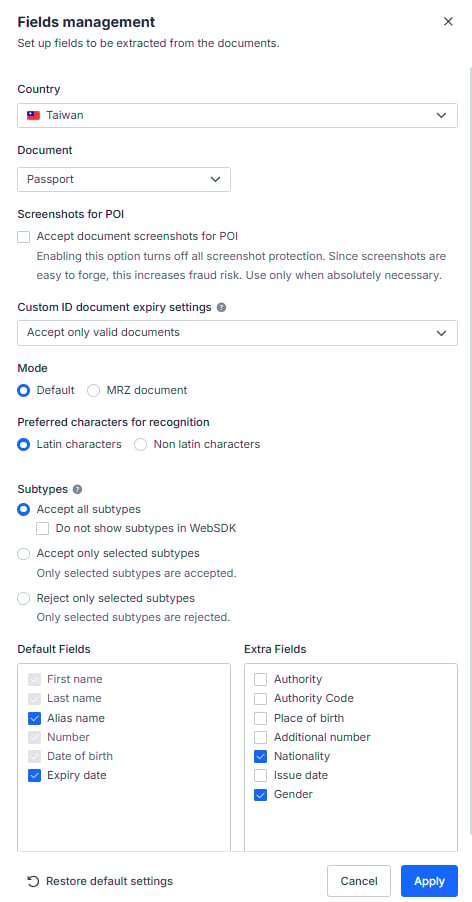
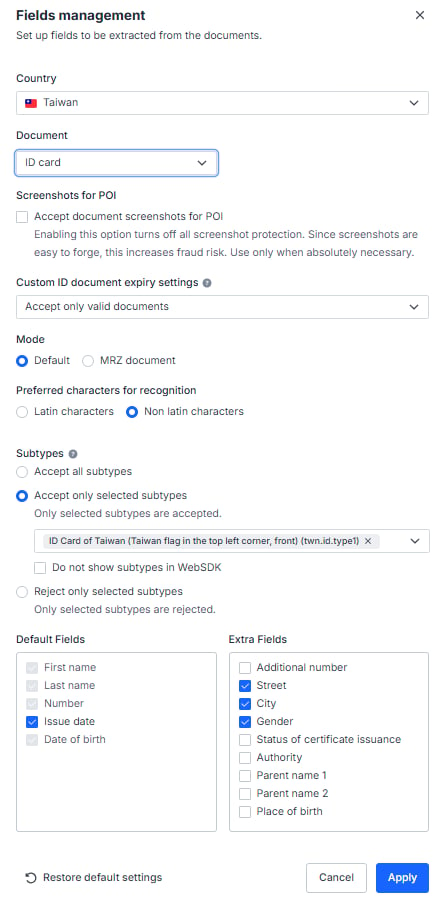
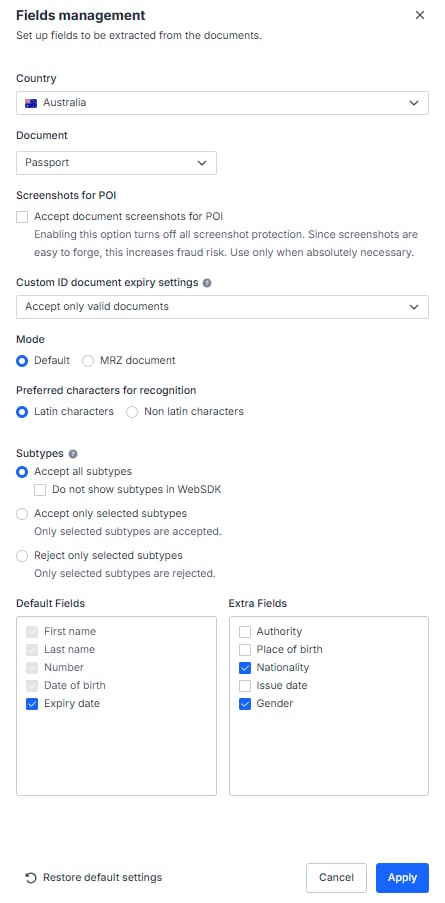
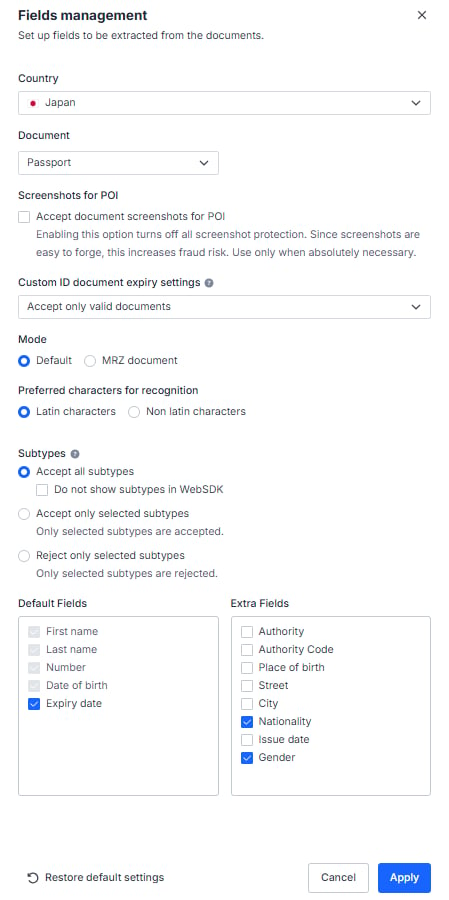
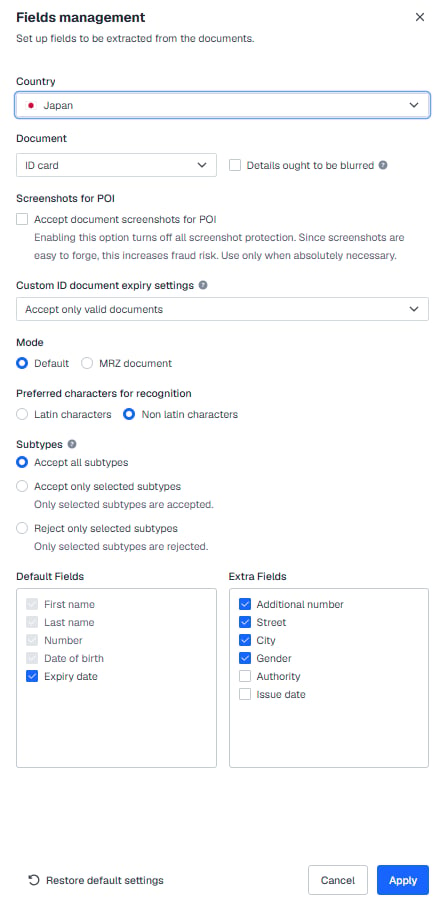
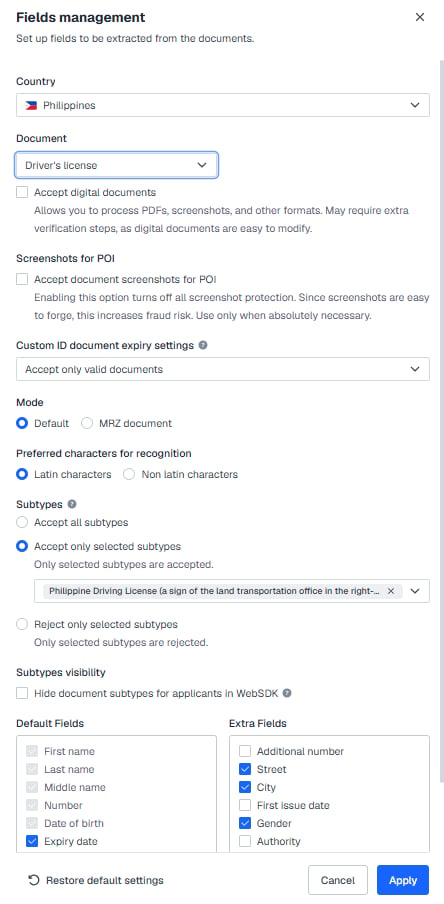
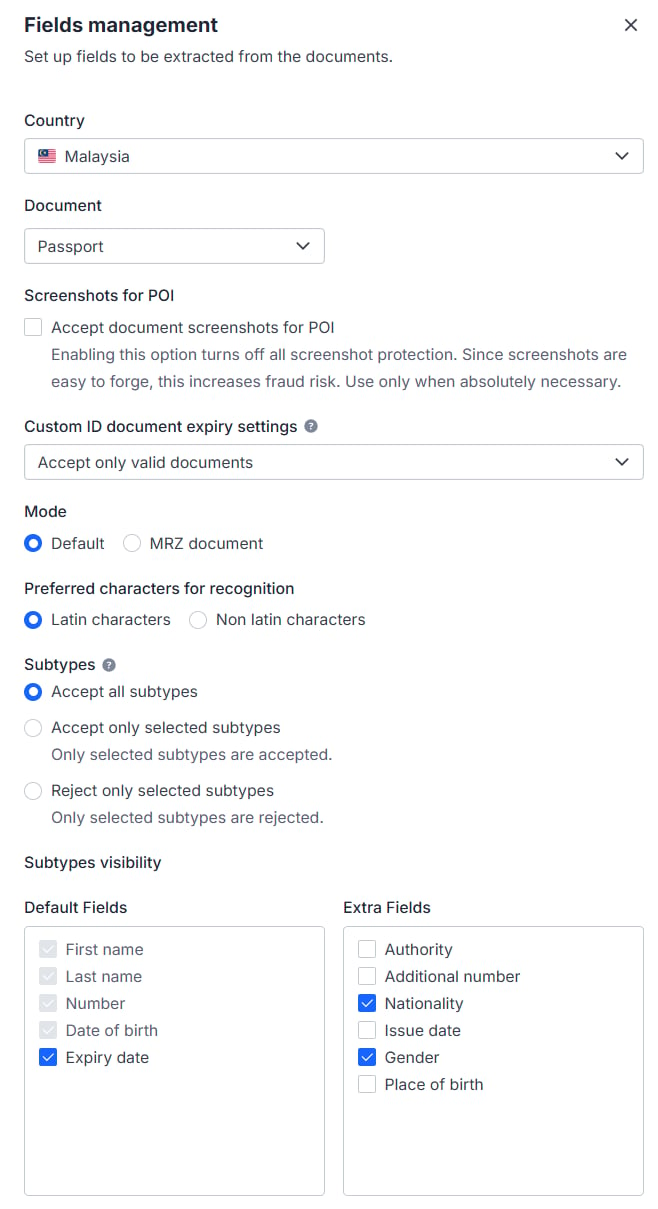
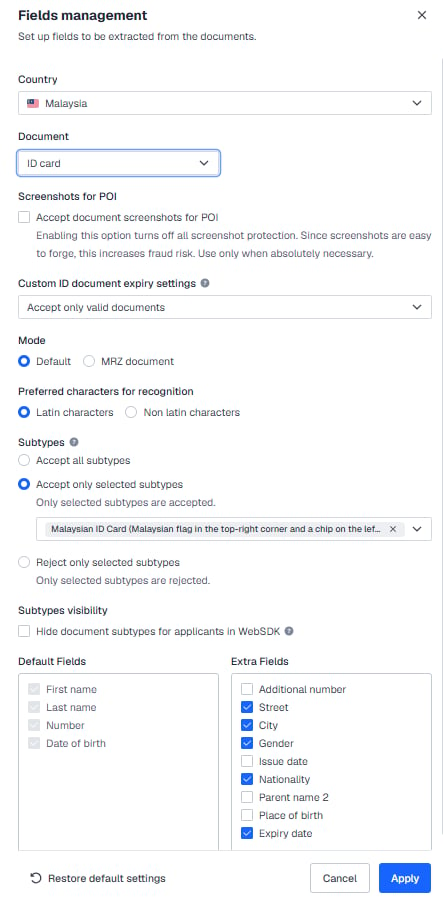
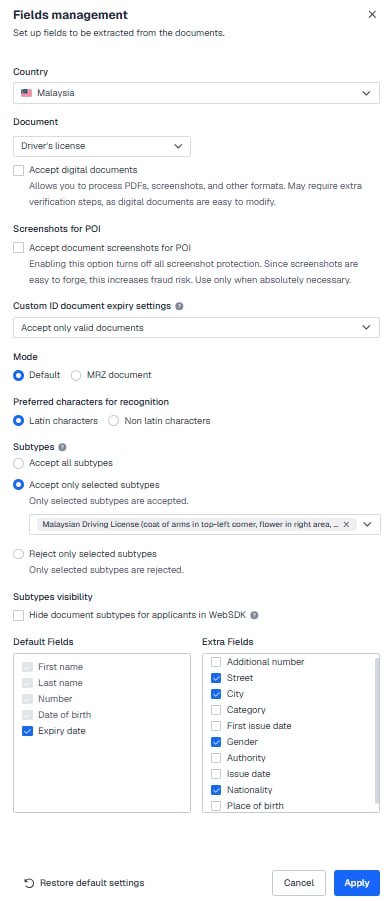
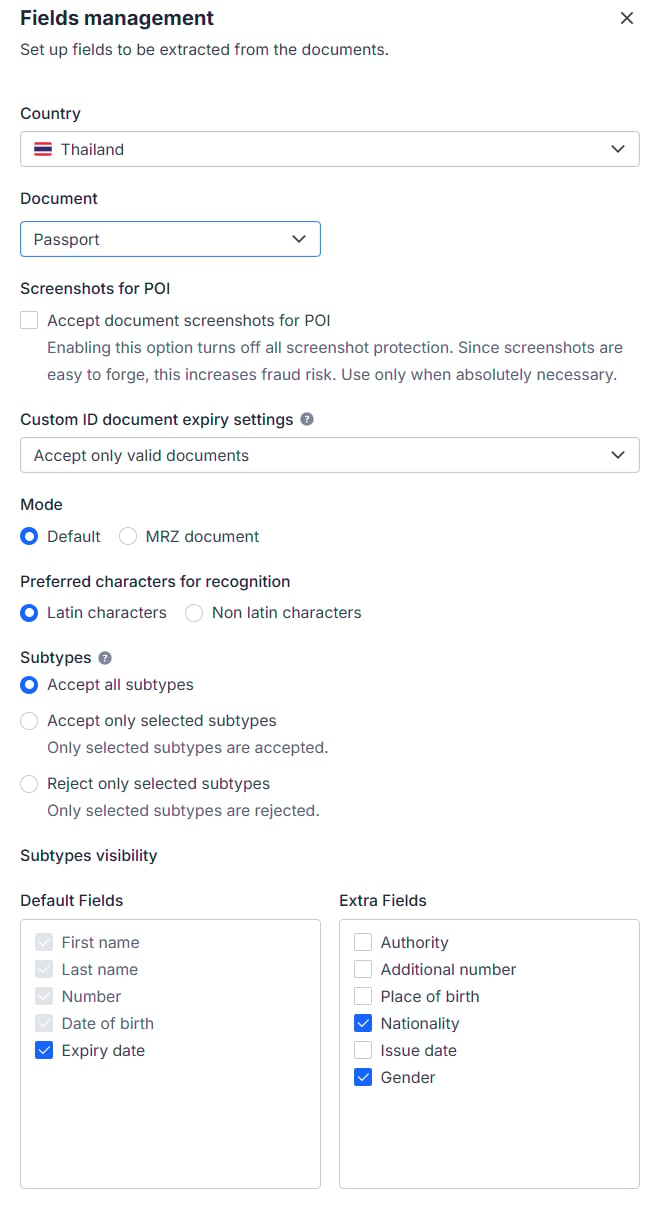
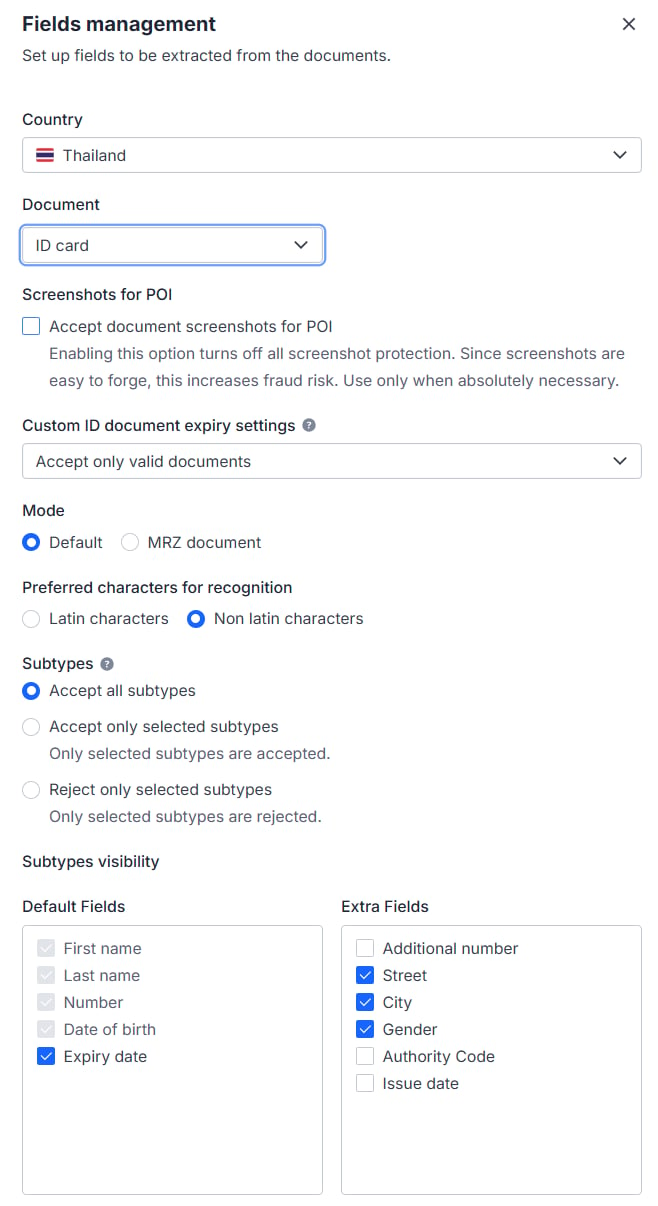
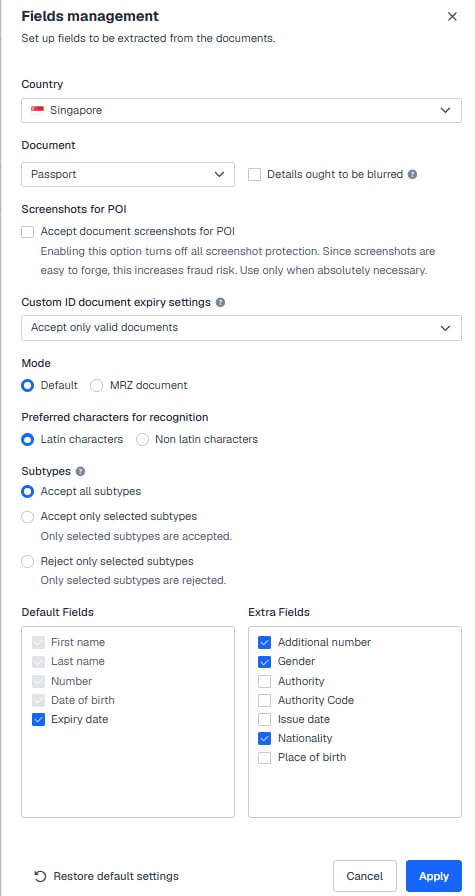
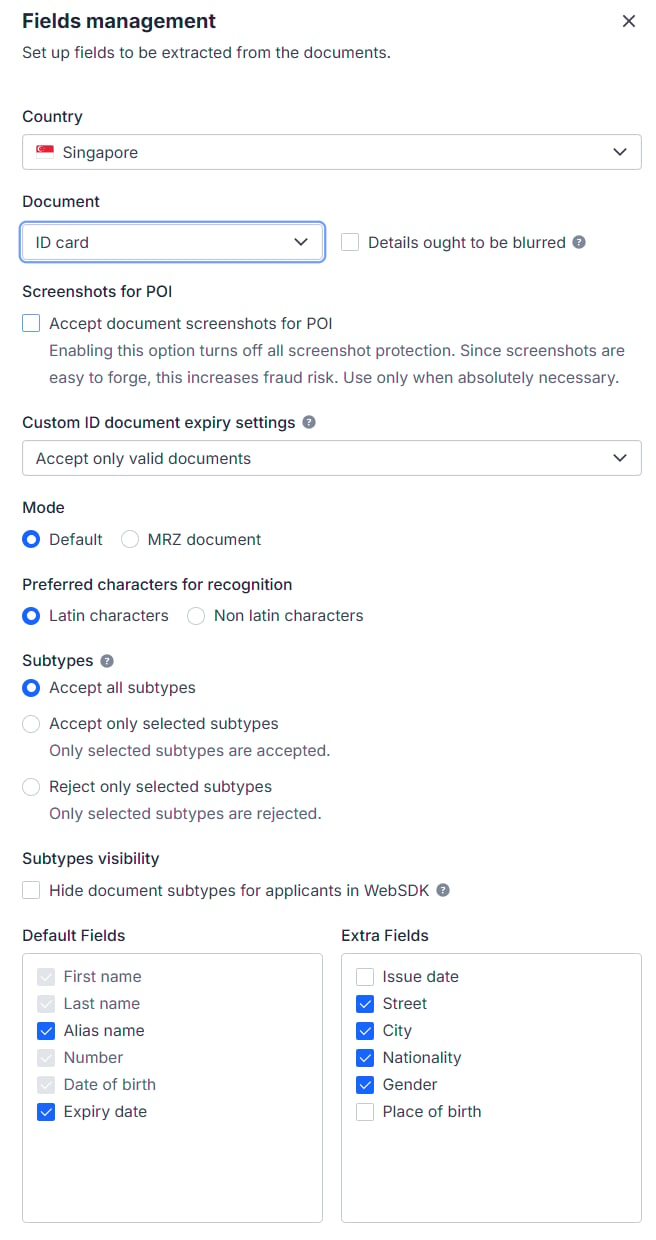
Supported countries: Taiwan, Australia, Japan, South Korea, Vietnam, the Philippines, Malaysia, Thailand and Singapore. Configure the accepted document types and subtypes for each country in Sumsub as shown in the screenshots below.
**Taiwan** — passport and ID card accepted (subtype `twn.id.type1` only)
Blacklisted countries (34): Afghanistan, Belarus, Bosnia and Herzegovina, Burundi, Central African Republic, Congo (DRC), Cuba, Guatemala, Guinea, Guinea-Bissau, Haiti, Iran, Iraq, Lebanon, Libya, Mali, Moldova, Montenegro, Myanmar, Nicaragua, Niger, North Korea, Russia, Serbia, Somalia, South Sudan, Sudan, Syria, Tunisia, Turkey, Ukraine, Venezuela, Yemen, Zimbabwe.
##### 2.2 POI accepted as POA for nine designated countries
Supported countries: Taiwan, Australia, Japan, South Korea, Vietnam, the Philippines, Malaysia, Thailand and Singapore. Configure the accepted document types and subtypes for each country in Sumsub as shown in the screenshots below.
**Taiwan** — passport and ID card accepted (subtype `twn.id.type1` only)

 **Australia** — passport only

 **Japan** — passport, My Number Card and driving license accepted (the IP address must be in Japan; if it is not, the user must submit a passport for verification)

 **South Korea** — passport and ID card accepted (subtype `kor.id.type1` only)

 **Vietnam** — passport, ID card (subtypes `vnm.id.type3` and `vnm.id.type4` only) and driving license (subtype `vnm.drvlic.type1` only) accepted

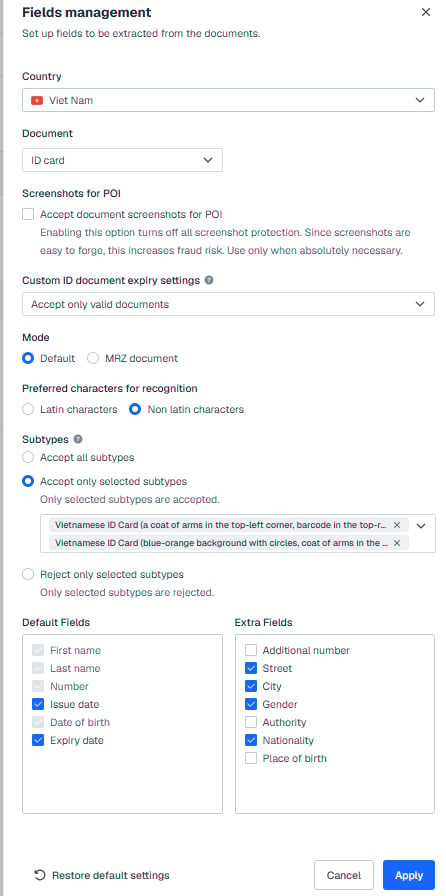
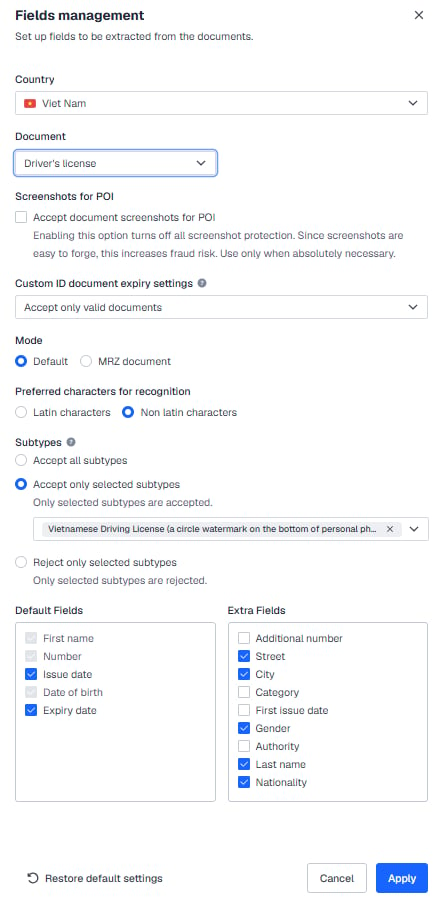 **Philippines** — passport, ID card (subtype `phl.id.type11` only) and driving license (subtype `phl.drvlic.type1` only) accepted

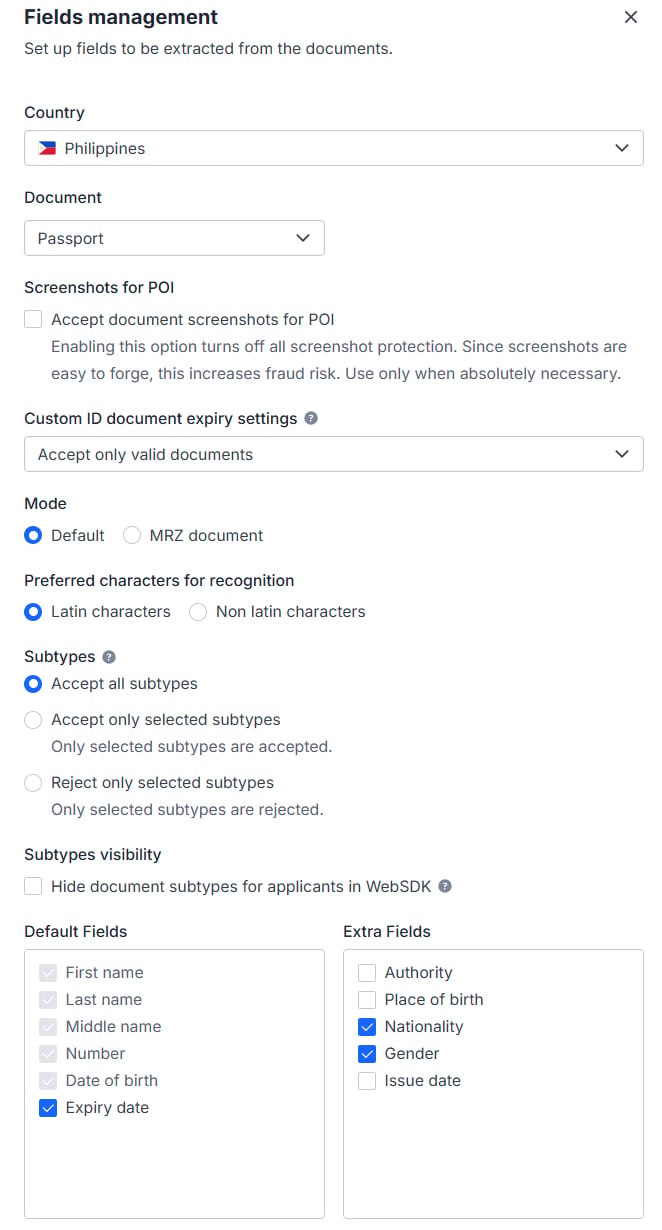
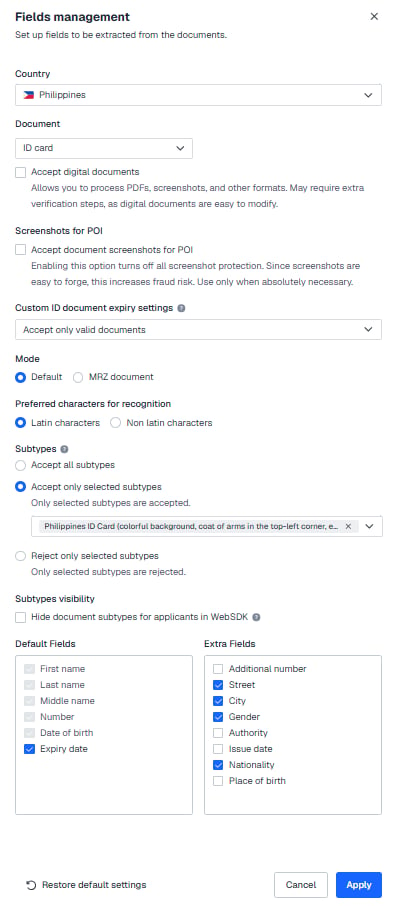
 **Malaysia** — passport, ID card (subtype `mys.id.type1` only) and driving license (subtype `mys.drvlic.type1` only) accepted

 **Thailand** — passport and Thai National ID Card accepted

 **Singapore** — passport and Singapore identity card (NRIC) accepted

 #### 2.3 USA
 #### 2.4 Other countries
Passport only, single-sided; ID cards, driving licenses and residence permits are not accepted.
#### 2.4 Other countries
Passport only, single-sided; ID cards, driving licenses and residence permits are not accepted.
 ### Part 2: Setting for POA (proof of address)
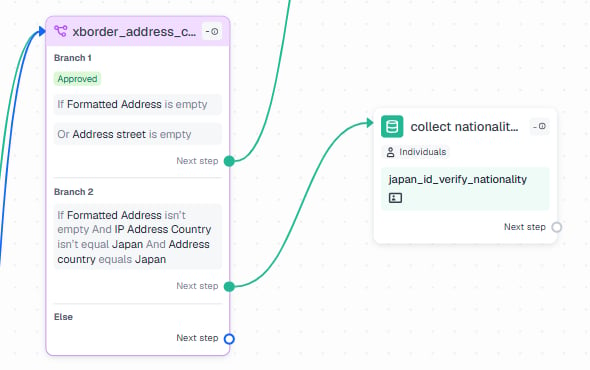
#### 1. Workflow builder
If the POI document carries no address, the user goes on to POA (proof of address) verification. If the POI document does carry an address but the address country is Japan and the user's IP is outside Japan, the user must additionally submit a passport to confirm nationality.
### Part 2: Setting for POA (proof of address)
#### 1. Workflow builder
If the POI document carries no address, the user goes on to POA (proof of address) verification. If the POI document does carry an address but the address country is Japan and the user's IP is outside Japan, the user must additionally submit a passport to confirm nationality.
 #### 2. User verification
Note: proof of address (POA) is accepted only from designated countries, as set out in your agreement with DCS.
#### 2. User verification
Note: proof of address (POA) is accepted only from designated countries, as set out in your agreement with DCS.
 #### 3. Verification level
**USA residents need to be rejected.**
#### 3. Verification level
**USA residents need to be rejected.**
 ***
## Next steps
* The resubmission path when shared data is rejected: [KYC Rejections and Resubmissions](./kyc-rejections)
* Acceptable document types and POA requirements: [KYC Documents](./kyc-documents) (same group)
* Compliance capability overview and navigation to each sub-page: [Compliance Overview](../basic-concepts/compliance-kyc-flow)
* Complete field specification for the card application endpoint: `POST /card/v1/virtual-card/apply`
***
## Next steps
* The resubmission path when shared data is rejected: [KYC Rejections and Resubmissions](./kyc-rejections)
* Acceptable document types and POA requirements: [KYC Documents](./kyc-documents) (same group)
* Compliance capability overview and navigation to each sub-page: [Compliance Overview](../basic-concepts/compliance-kyc-flow)
* Complete field specification for the card application endpoint: `POST /card/v1/virtual-card/apply`