> ## Documentation Index
> Fetch the complete documentation index at: https://docs.thedecard.com/llms.txt
> Use this file to discover all available pages before exploring further.
# Issuing Cards (Virtual and Physical)
> How to issue a virtual card (two options: the H5 hosted guidance page or the OPEN-API) and a physical card (hosted guidance page only) for a user who has passed KYC, including POA file exchange, application status lookups, and what to do once you have the card.
## 📄 Overview
Once a user has passed KYC, a single API call issues them a virtual card they can spend online immediately, and they can order a physical card afterwards if they want one. As a licensed issuer with its own BINs, DCS handles card issuing, KYC review, authorization decisions and settlement; all you deal with is how to submit the application, how to check its status, and what to do once the card exists.
DCS supports two card forms:
* **Virtual card**: no physical medium. It is activated automatically once the application is approved and can be spent online right away.
* **Physical card**: shipped to the user, and **must be activated and given a PIN** on arrival before it can be used.
> Virtual cards fall into two usage patterns: **single-use virtual cards** (void after one transaction, the most secure option, suited to one-off payments) and **reusable virtual cards** (usable repeatedly until the card expires, normally with per-transaction and cumulative limits). Neither can be swiped in a physical store or used at an ATM. Which pattern applies is determined by the card product (`categoryId`), so confirm it with DCS before you start issuing.
### Prerequisites
* The user has registered and has an account (see [Signing Up a Customer](../signing-up-a-customer/overview)).
* The KYC material is complete: the Sumsub `shareToken`, any required POA documents, and employment and source-of-funds information.
### Two ways to apply
The two options coexist; pick one:
| Option | Best for | Entry point |
| ----------------------------- | ---------------------------------------------------------------------------------- | ------------------------------------------------------------------------------------------------------------------------------ |
| **Embedded H5 guidance page** | Reusing the ready-made DCS KYC and card issuing UI so you write less frontend code | `POST /redirect/v2/guidance-link` (see [H5 KYC / Card Application Guidance Page](../../integration-resources/h5-kyc-guidance)) |
| **OPEN-API** | Running your own frontend and collecting KYC material yourself | `POST /card/v1/virtual-card/apply` (virtual cards only) |
**The DeCard-Managed model has no direct "order physical card" API**. Ordering, activating and setting the PIN on a physical card **all happen through the H5 hosted guidance page** (see the physical card section below). There is no `physical-card/apply` endpoint and no virtual-to-physical conversion endpoint.
### The application flow at a glance

 The OPEN-API path has only two steps: submit the application, then poll until it reaches a terminal state (you can also receive the outcome by webhook):

 > **If you need to submit a POA document with the application**, complete these three steps first:
>
> 1. Call `POST /account/v1/generate-file-upload-prepare` to obtain a pre-signed upload URL and an `objectKey`;
> 2. `PUT` the POA file straight to the URL you were given;
> 3. Put the `objectKey` into the POA fields of the application request (see the field table below).
***
## Applying for a virtual card
### Option 1: embedded H5 guidance page
Call `POST /redirect/v2/guidance-link` with `action` set to `KYC_GUIDE` to obtain a guidance page URL. Open it in your frontend and DCS walks the user through KYC and card issuing. For the parameters and rendering options, see [H5 KYC / Card Application Guidance Page](../../integration-resources/h5-kyc-guidance).
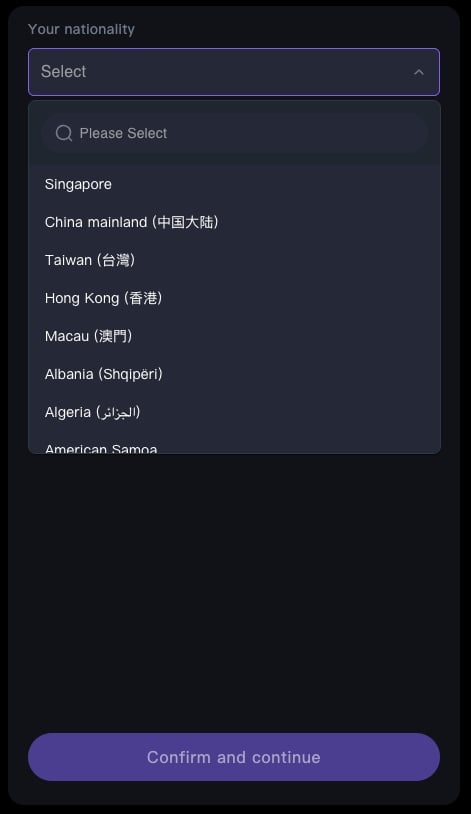
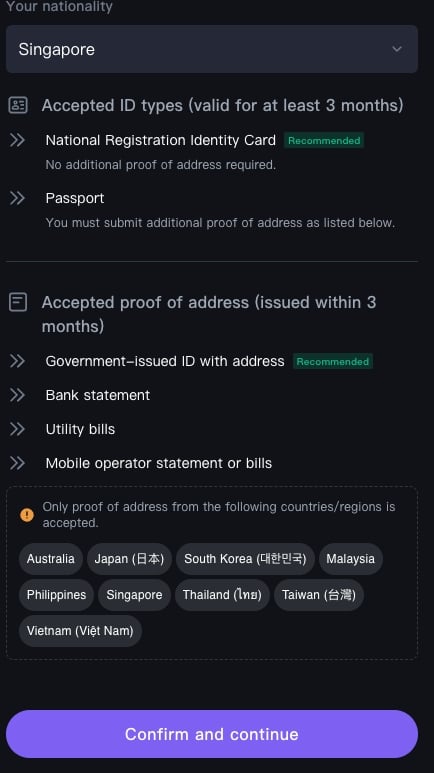
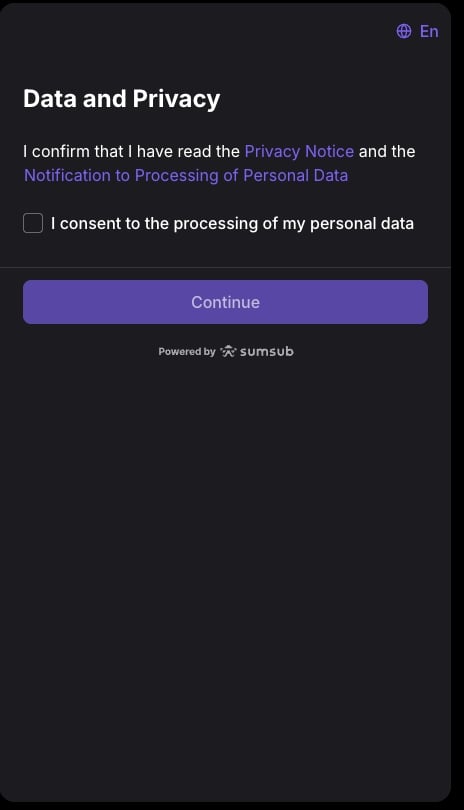
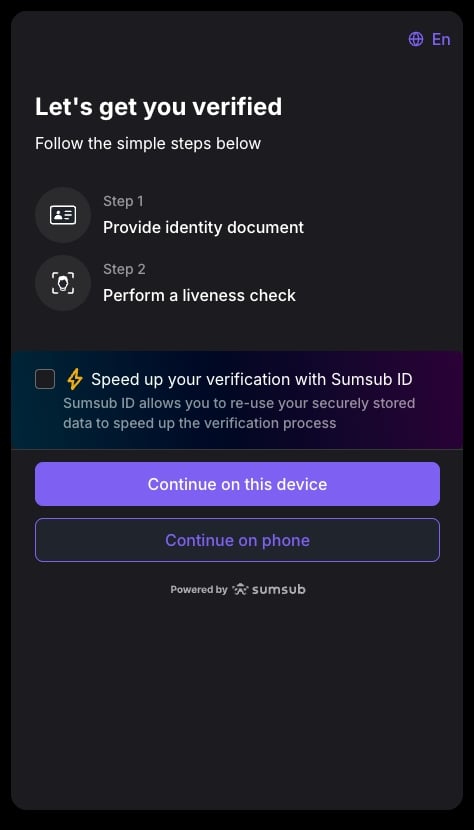
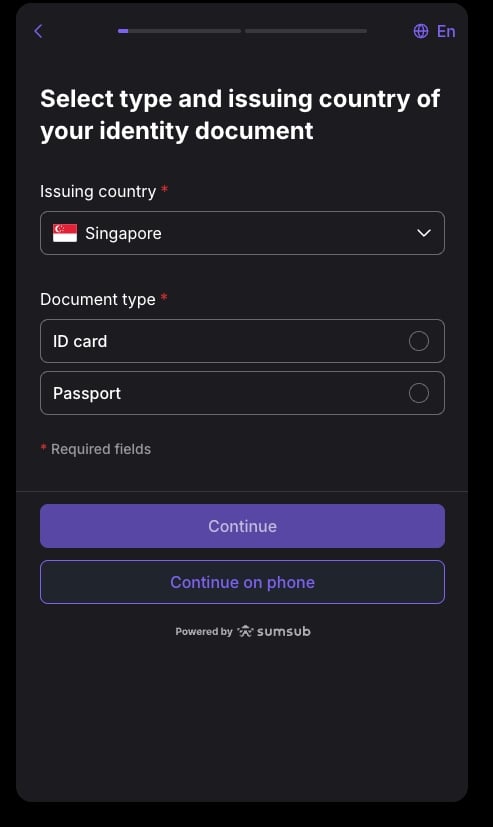
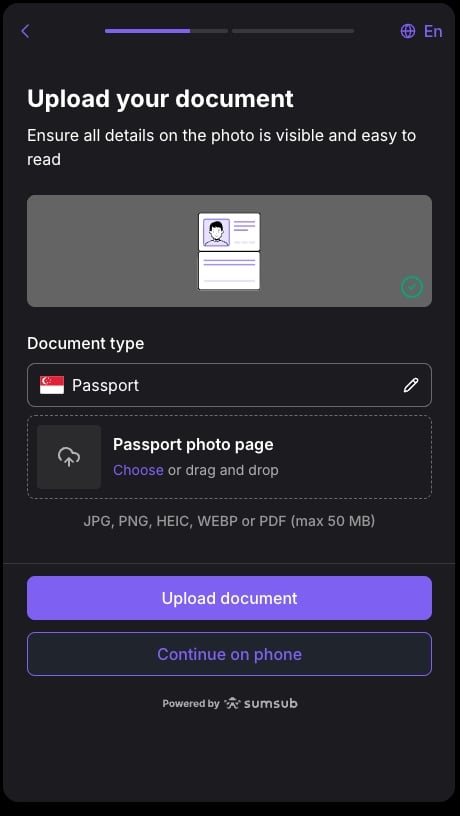
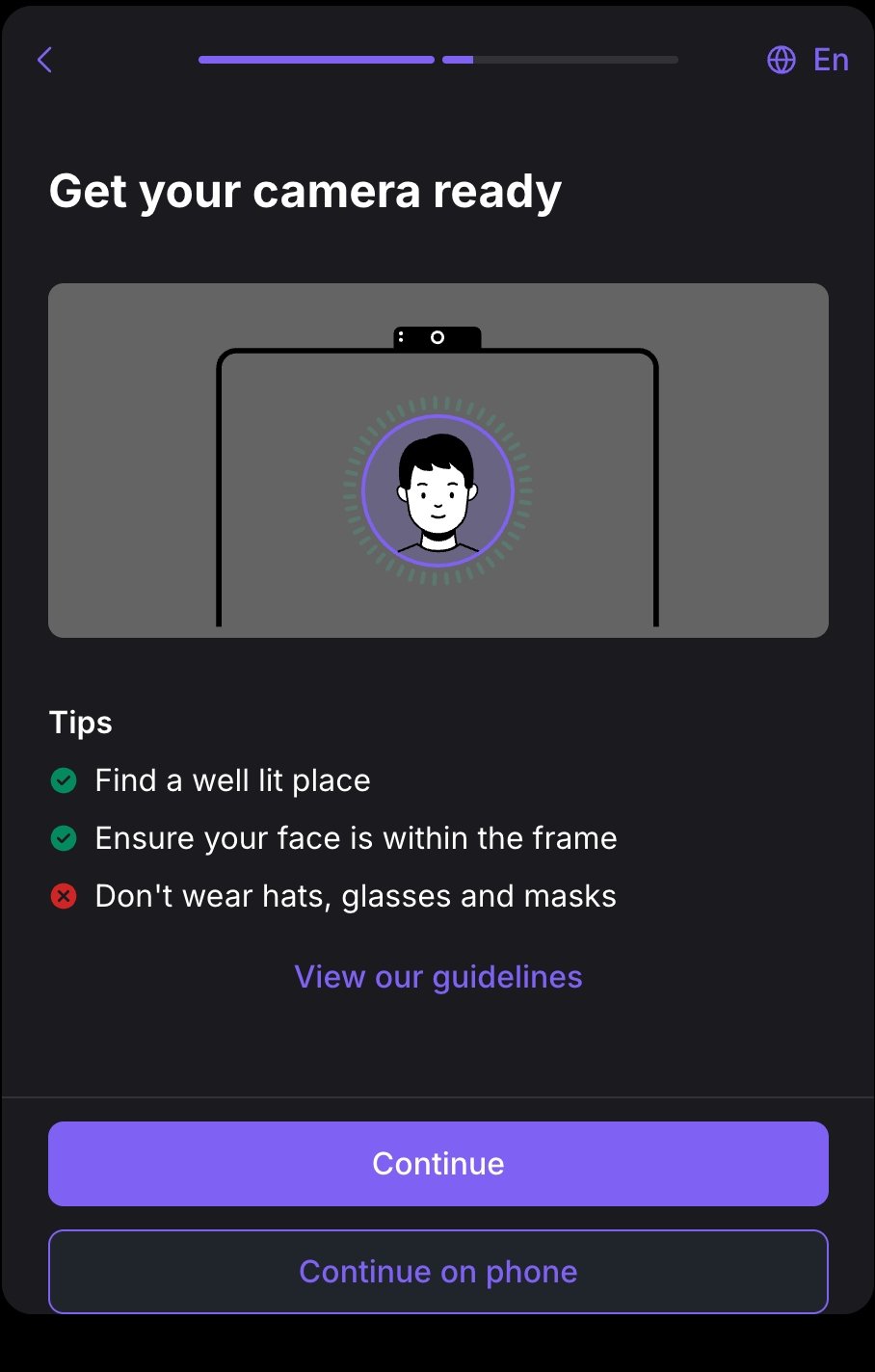
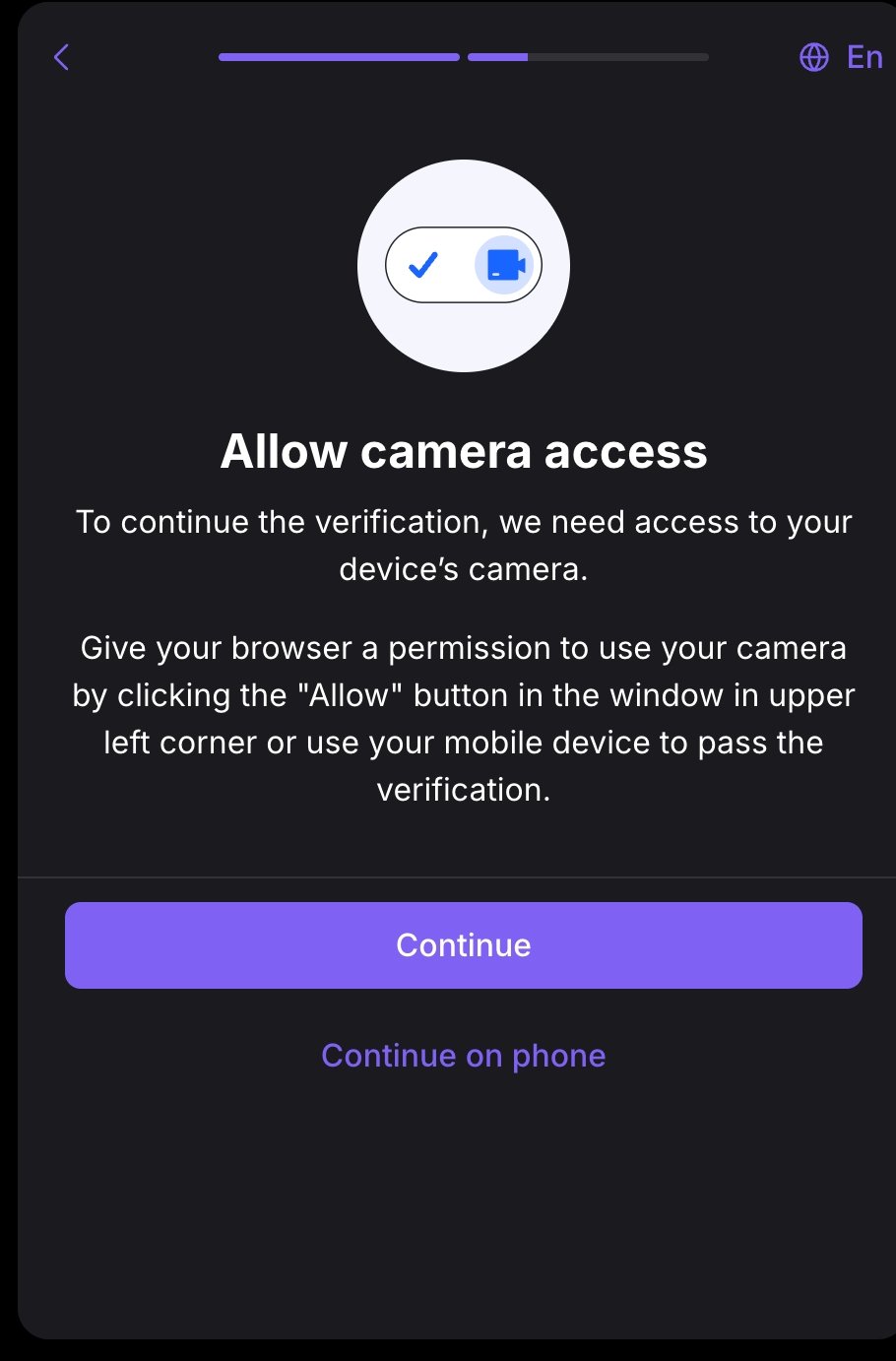
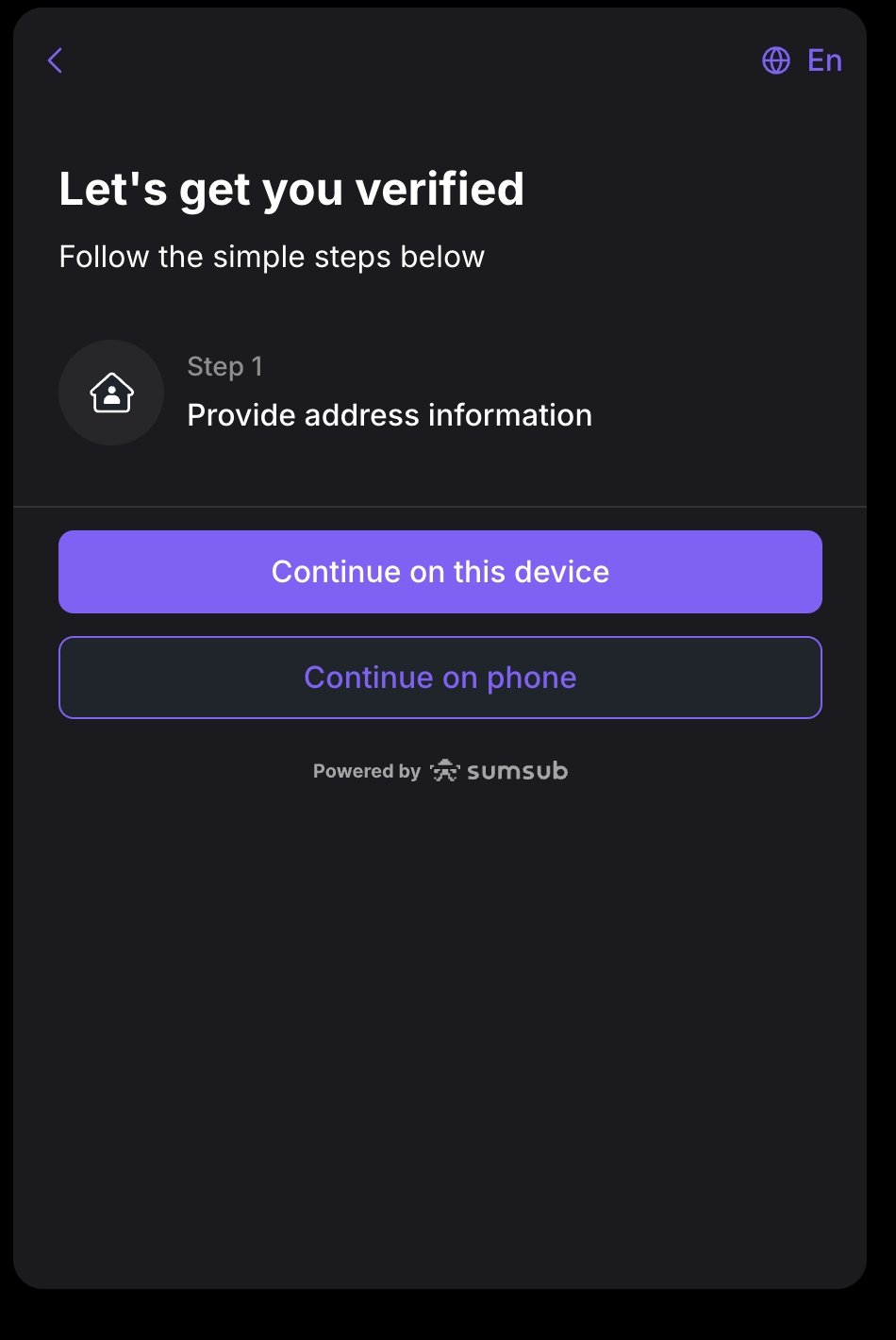
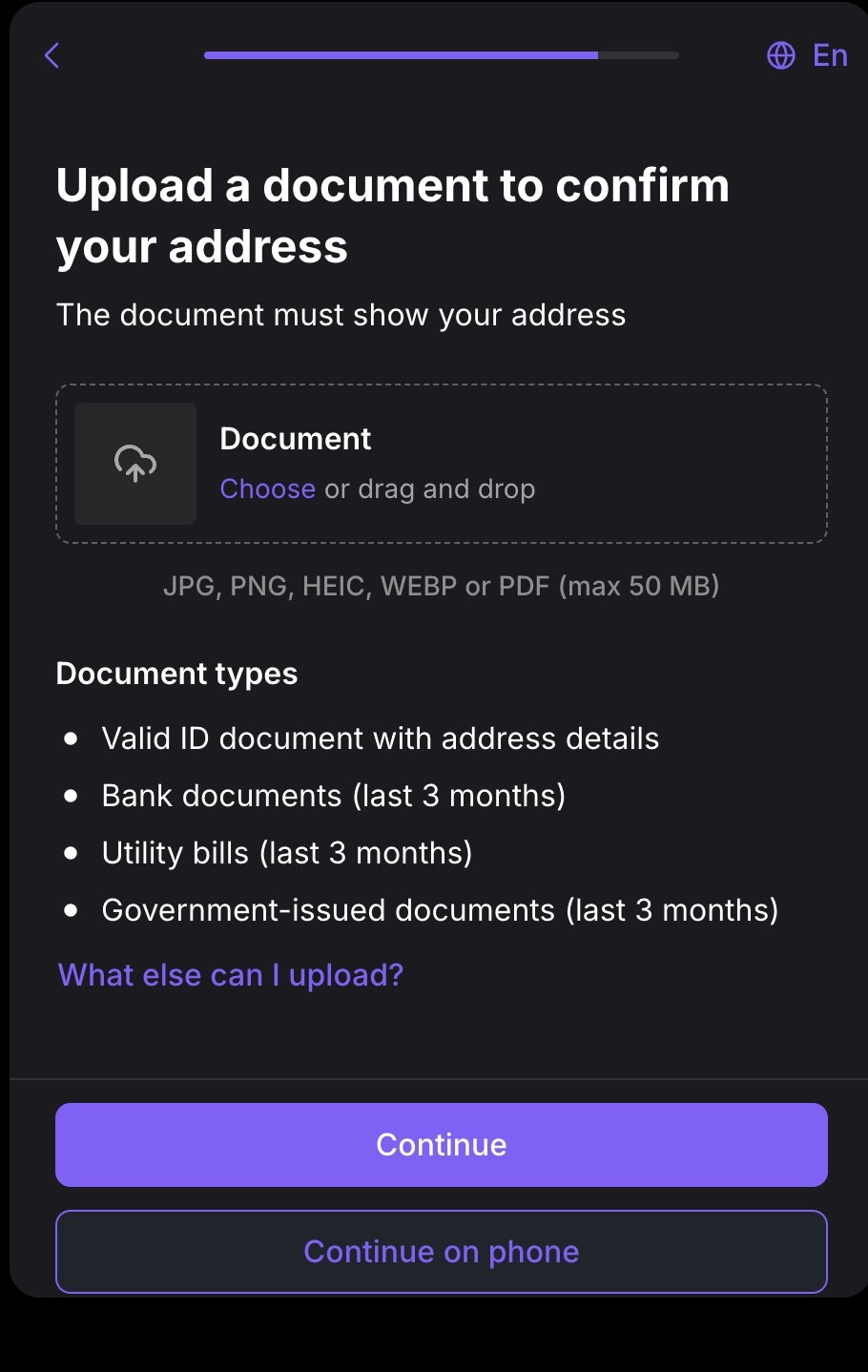
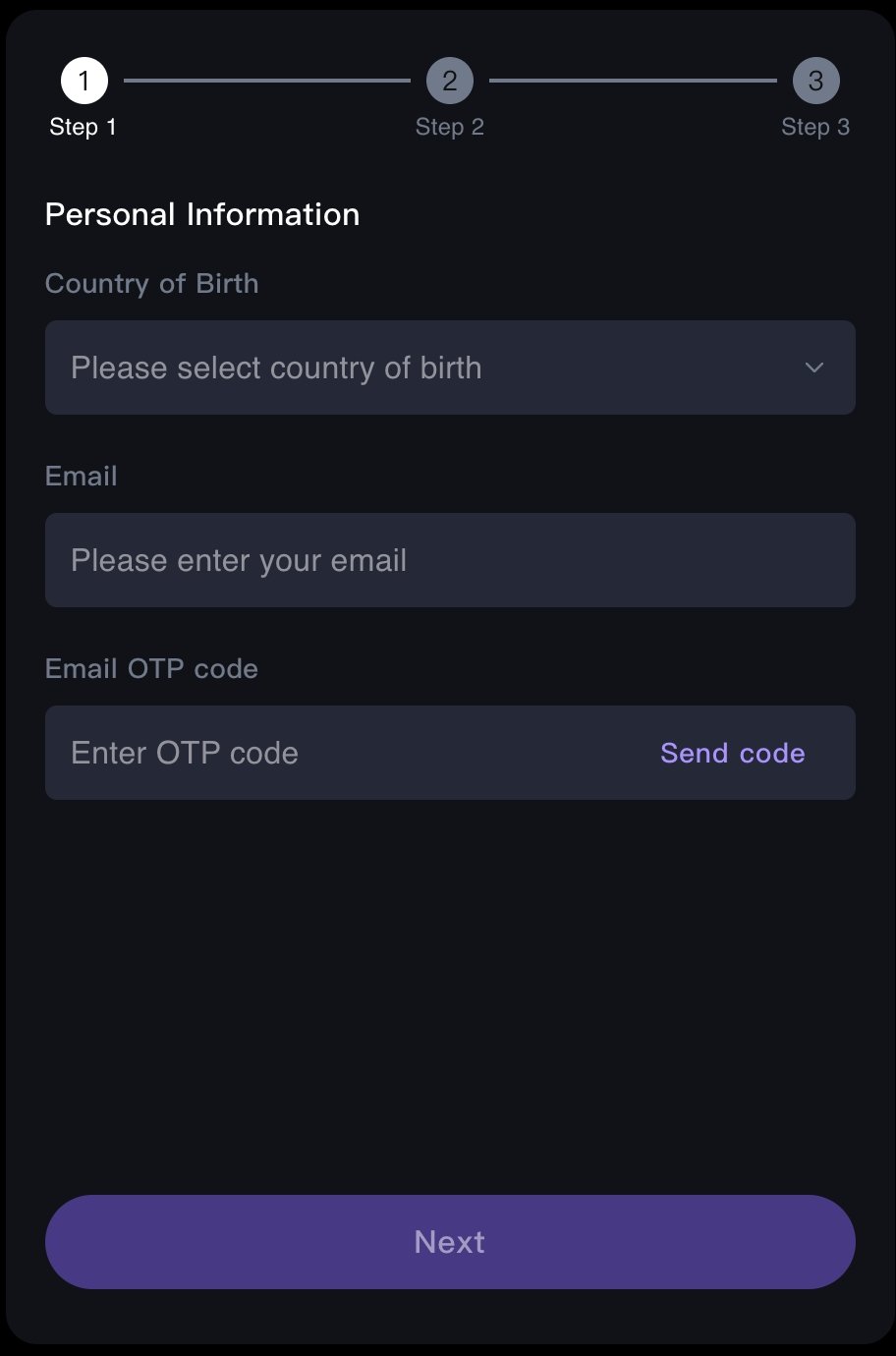
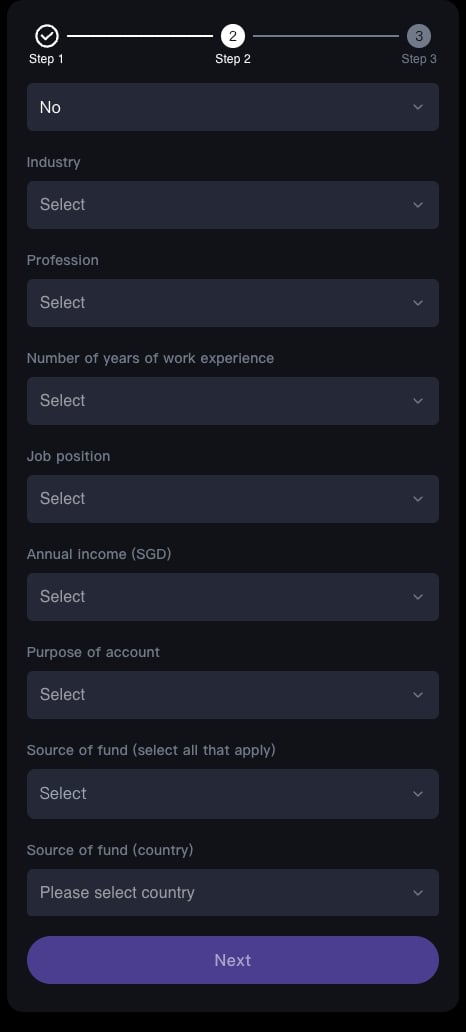
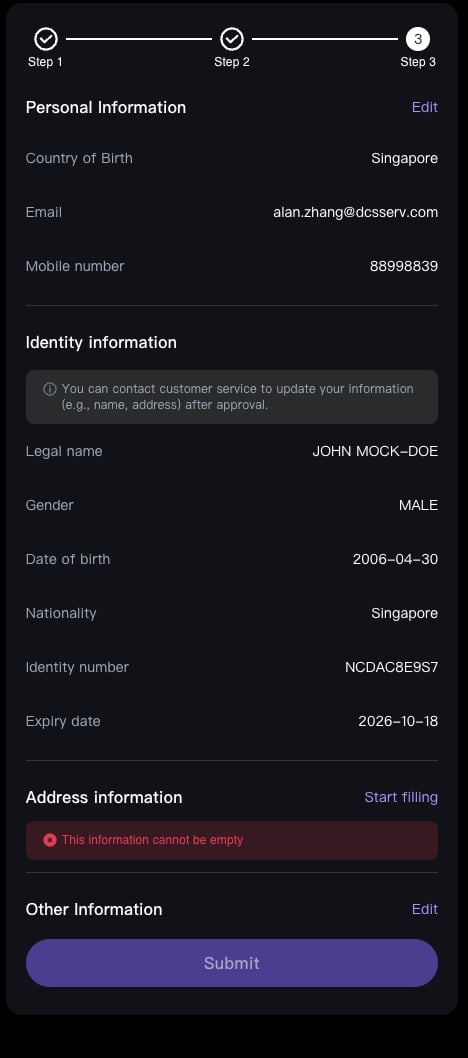
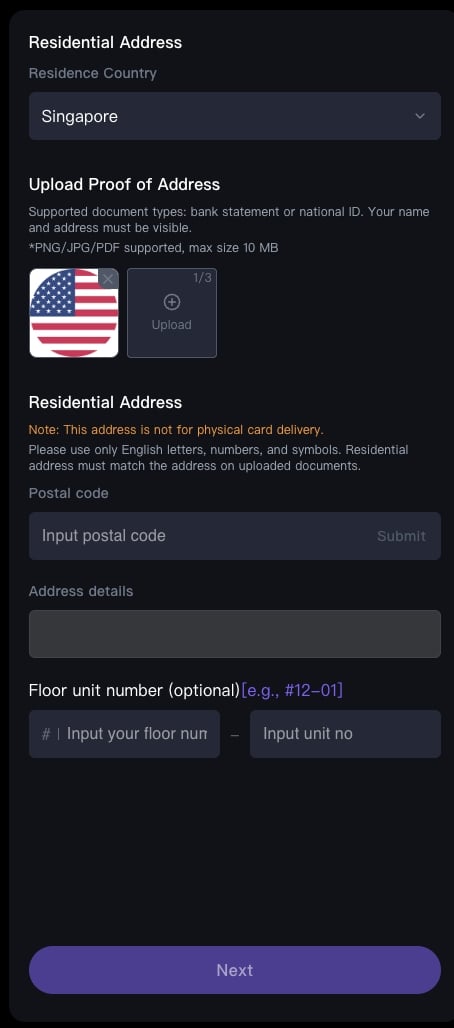
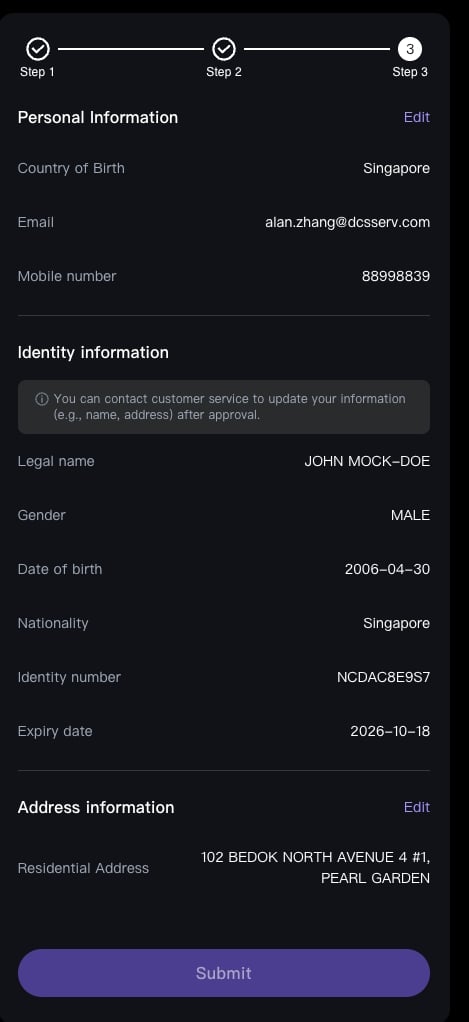
#### Screenshots of the H5 application flow
The two sets of screenshots below show the full experience of applying for a virtual card through the H5 guidance page, so you can preview what the pages look like.
**KYC vendor verification** (the user completes each identity verification step inside the guidance page):
> **If you need to submit a POA document with the application**, complete these three steps first:
>
> 1. Call `POST /account/v1/generate-file-upload-prepare` to obtain a pre-signed upload URL and an `objectKey`;
> 2. `PUT` the POA file straight to the URL you were given;
> 3. Put the `objectKey` into the POA fields of the application request (see the field table below).
***
## Applying for a virtual card
### Option 1: embedded H5 guidance page
Call `POST /redirect/v2/guidance-link` with `action` set to `KYC_GUIDE` to obtain a guidance page URL. Open it in your frontend and DCS walks the user through KYC and card issuing. For the parameters and rendering options, see [H5 KYC / Card Application Guidance Page](../../integration-resources/h5-kyc-guidance).
#### Screenshots of the H5 application flow
The two sets of screenshots below show the full experience of applying for a virtual card through the H5 guidance page, so you can preview what the pages look like.
**KYC vendor verification** (the user completes each identity verification step inside the guidance page):

 **POA collection during KYC** (the user fills in and submits proof of address and other supporting information inside the guidance page):
 ### Option 2: OPEN-API
Call `POST /card/v1/virtual-card/apply` to submit the application directly, KYC material included.
**Request fields**:
| Field | Type | Required | Description | Constraint |
| ------------------------------- | -------------- | ----------- | -------------------------------------------------------------------------------------------------------------------------------------------------------------------------------------------------------------------------------------------------------------------------- | ---------------- |
| `externalUserId` | string | REQUIRED | User ID | External user ID |
| `categoryId` | integer (Long) | REQUIRED | Card category ID | |
| `applyRef` | string | REQUIRED | Idempotency key for the application | |
| `kycInfo.sumsubShareToken` | string | REQUIRED | Sumsub token | Max 500 |
| `kycInfo.email` | string | REQUIRED | Email address | Max 100 |
| `kycInfo.poaDocType` | string | POA cases | POA document type, as an enum (for example `BANK_STATEMENT`; a `UTILITY_BILL` must be **no older than 90 days, or 75 days in France**). For the full list, see [Card Application Data Dictionary](./application-data-dictionary#proof-of-address-document-type-poadoctype) | Max 50 |
| `kycInfo.poaDocUrlList` | string\[] | POA cases | List of POA file references (see [POA file exchange](#poa-file-exchange)) | |
| `kycInfo.poaDocDate` | string | POA cases | Date on the POA document, which must be no older than three months | Max 10 |
| `kycInfo.addressLine1` | string | Conditional | Address line 1 | Max 1024 |
| `kycInfo.addressLine2` | string | Optional | Address line 2 | Max 1024 |
| `kycInfo.state` | string | Optional | State or province | Max 128 |
| `kycInfo.city` | string | Conditional | City | Max 128 |
| `kycInfo.postalCode` | string | Conditional | Postal code | Max 50 |
| `kycInfo.country` | string | Conditional | Two-letter ISO country code (for example CN/US/SG) | Exactly 2 |
| `kycInfo.employmentStatus` | string | Conditional | Employment status | Max 50 |
| `kycInfo.employerName` | string | Conditional | Employer name; **required** when `employmentStatus = EMPLOYED` | Max 100 |
| `kycInfo.employmentJobIndustry` | string | Conditional | Industry | Max 50 |
| `kycInfo.occupation` | string | Conditional | Occupation | Max 50 |
| `kycInfo.jobSeniority` | string | Conditional | Job seniority | Max 50 |
| `kycInfo.purposeOfAccount` | string | Conditional | Purpose of the account | Max 100 |
| `kycInfo.sourceOfFunds` | string | Conditional | Source of funds | Max 100 |
| `kycInfo.sourceOfFundsCountry` | string | Conditional | Two-letter ISO country code for the source of funds | Exactly 2 |
| `kycInfo.sourceOfWealth` | string | Conditional | Source of wealth | Max 100 |
| `kycInfo.fullName` | string | Optional | Full name, used by enhanced KYC in the H5 flow | |
| `kycInfo.birthday` | string | Optional | Date of birth, used by enhanced KYC in the H5 flow | |
| `kycInfo.gender` | string | Optional | Gender, used by enhanced KYC in the H5 flow | |
| `kycInfo.residenceCountry` | string | Optional | Country of residence, used by enhanced KYC in the H5 flow | |
Treat the field lengths above as indicative; the validation errors returned by a live call are the safer reference. Do not carry over the length rules from any other solution.
**Request example** (placeholders, no real data):
```json theme={null}
{
"externalUserId": "",
"categoryId": 1001,
"applyRef": "",
"kycInfo": {
"sumsubShareToken": "",
"email": "user@example.com",
"poaDocType": "BANK_STATEMENT",
"poaDocUrlList": [""],
"poaDocDate": "",
"addressLine1": "",
"city": "",
"postalCode": "",
"country": "SG",
"employmentStatus": "EMPLOYED",
"employerName": "",
"employmentJobIndustry": "",
"occupation": "",
"jobSeniority": "",
"purposeOfAccount": "",
"sourceOfFunds": "",
"sourceOfFundsCountry": "SG",
"sourceOfWealth": ""
}
}
```
**Response fields** (`data`):
| Field | Type | Description |
| --------------- | ------- | ------------------------------------------------------------------------------------------------------ |
| `applyId` | string | Application ID |
| `cardId` | string | Card ID, returned once the application succeeds |
| `categoryId` | integer | Card category ID |
| `applyRef` | string | Idempotency key, echoed back |
| `status` | string | Application status, one of `PENDING / SUCCEED / FAILED`; see [Application status](#application-status) |
| `errorCode` | string | Error code on failure |
| `errorReason` | string | Description of the failure |
| `needEddFile` | boolean | Whether EDD (enhanced due diligence) documents are still needed |
| `needExtraInfo` | boolean | Whether the user must supply more information; see [needExtraInfo](#needextrainfo) |
| `remark` | string | Remarks |
**Successful response example** (masked):
```json theme={null}
{
"code": "SYS_SUCCESS",
"message": "SUCCESS",
"messageDetail": null,
"data": {
"applyId": "",
"cardId": "",
"categoryId": 1001,
"applyRef": "",
"status": "SUCCEED",
"needEddFile": false,
"needExtraInfo": false,
"remark": null
}
}
```
**Failure response example** (masked):
```json theme={null}
{
"code": "SYS_SUCCESS",
"message": "SUCCESS",
"messageDetail": null,
"data": {
"applyId": "",
"status": "FAILED",
"errorCode": "",
"errorReason": "",
"needEddFile": false,
"needExtraInfo": false
}
}
```
Every response uses the envelope `{ code, message, messageDetail, data }` and there is no `success` boolean. `code = SYS_SUCCESS` only means the request was accepted; **the business outcome is in `data.status`**.
***
## POA file exchange
POA (proof of address) documents are exchanged through a **pre-signed upload**; you never post the file to the card issuing endpoint. Three steps:
1. Call `POST /account/v1/generate-file-upload-prepare` with the body `{ "fileNames": [""] }` to obtain an upload address (a pre-signed URL) and an `objectKey` for each file.
2. From your server, **`PUT`** the POA file to the pre-signed `url` you were given.
3. Pass the returned `objectKey` back as an element of `poaDocUrlList` on the card issuing endpoint (or on a later KYC top-up endpoint).
Each item in the returned `data` array carries `fileName` (the original file name), `url` (the pre-signed upload address) and `objectKey` (the server-side object key you send back).
**Upload example** (Java, placeholder pre-signed URL, no PII):
```java theme={null}
import org.apache.http.client.methods.CloseableHttpResponse;
import org.apache.http.client.methods.HttpPut;
import org.apache.http.entity.FileEntity;
import org.apache.http.impl.client.CloseableHttpClient;
import org.apache.http.impl.client.HttpClients;
import org.apache.http.util.EntityUtils;
import java.io.File;
import java.io.IOException;
class UploadPoa {
public static void main(String[] args) throws IOException {
String preUploadURL = "";
CloseableHttpClient httpClient = HttpClients.createDefault();
HttpPut httpPut = new HttpPut(preUploadURL);
File file = new File("");
httpPut.setEntity(new FileEntity(file));
try (CloseableHttpResponse response = httpClient.execute(httpPut)) {
if (response.getStatusLine().getStatusCode() == 200) {
System.out.println(EntityUtils.toString(response.getEntity()));
}
}
}
}
```
> The pre-signed URL accepts a `PUT` upload, so use `HttpPut`.
***
## Ordering a physical card (H5 guidance page)
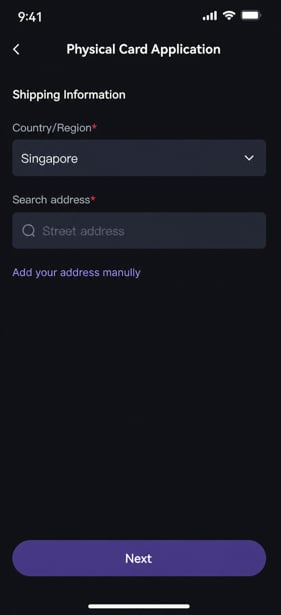
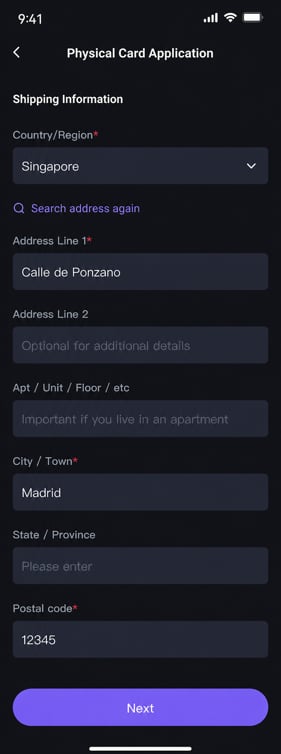
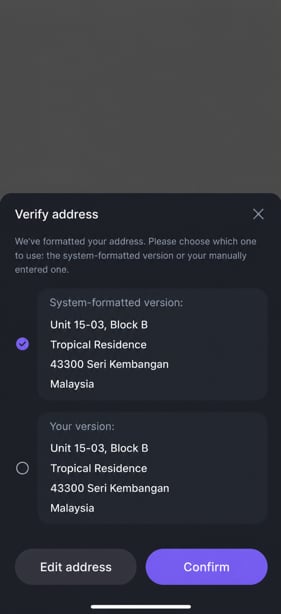
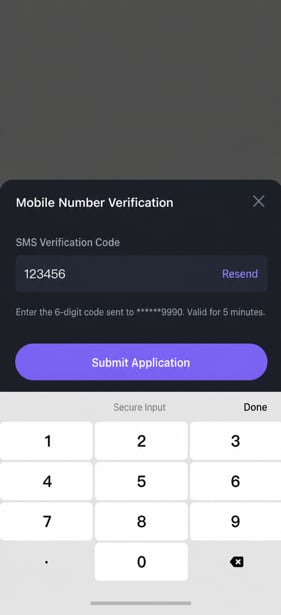
Ordering, activating and setting the PIN on a physical card all run through `POST /redirect/v2/guidance-link`, which returns the URL of the matching H5 page for your frontend to open so the user can finish the job. **There is no direct API.** For the guidance page parameters, see [H5 KYC / Card Application Guidance Page](../../integration-resources/h5-kyc-guidance).
| Operation | `action` | Description |
| ------------------------ | ---------------------- | --------------------------------------------------------------------------------------------------------------------------- |
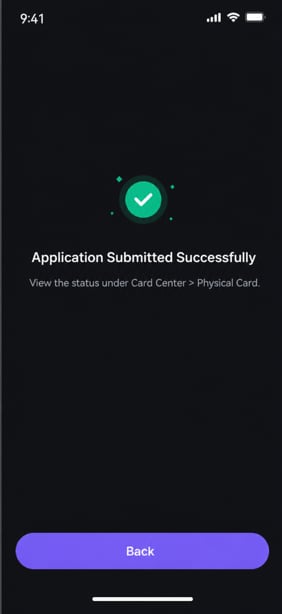
| Order a physical card | `CREATE_PHYSICAL_CARD` | The user fills in the shipping details and submits the order; once accepted, the physical card sits in the "inactive" state |
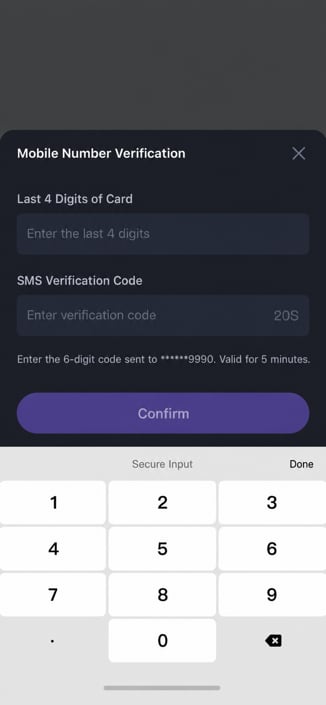
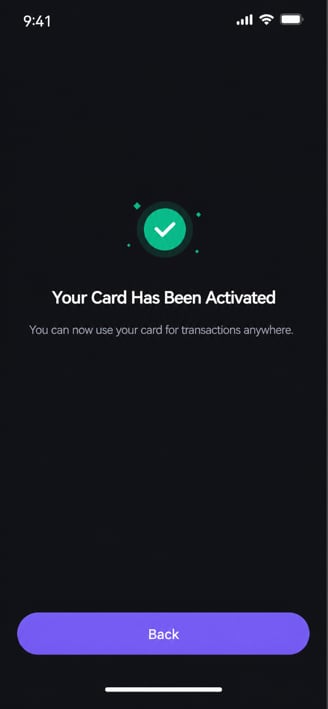
| Activate a physical card | `ACTIVE_PHYSICAL_CARD` | The user activates the card once it arrives |
| Set or update the PIN | `UPDATE_PIN` | A PIN must be set after activation before the card can be used |
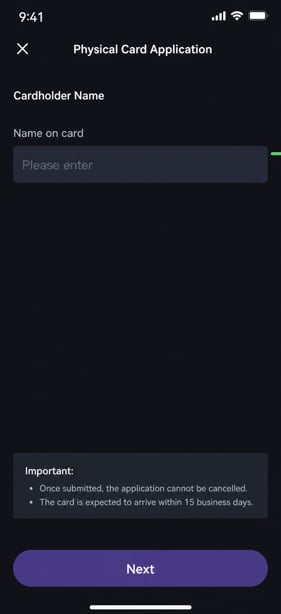
**Ordering a physical card** (`action=CREATE_PHYSICAL_CARD`; the user fills in the shipping details inside the guidance page and submits):
### Option 2: OPEN-API
Call `POST /card/v1/virtual-card/apply` to submit the application directly, KYC material included.
**Request fields**:
| Field | Type | Required | Description | Constraint |
| ------------------------------- | -------------- | ----------- | -------------------------------------------------------------------------------------------------------------------------------------------------------------------------------------------------------------------------------------------------------------------------- | ---------------- |
| `externalUserId` | string | REQUIRED | User ID | External user ID |
| `categoryId` | integer (Long) | REQUIRED | Card category ID | |
| `applyRef` | string | REQUIRED | Idempotency key for the application | |
| `kycInfo.sumsubShareToken` | string | REQUIRED | Sumsub token | Max 500 |
| `kycInfo.email` | string | REQUIRED | Email address | Max 100 |
| `kycInfo.poaDocType` | string | POA cases | POA document type, as an enum (for example `BANK_STATEMENT`; a `UTILITY_BILL` must be **no older than 90 days, or 75 days in France**). For the full list, see [Card Application Data Dictionary](./application-data-dictionary#proof-of-address-document-type-poadoctype) | Max 50 |
| `kycInfo.poaDocUrlList` | string\[] | POA cases | List of POA file references (see [POA file exchange](#poa-file-exchange)) | |
| `kycInfo.poaDocDate` | string | POA cases | Date on the POA document, which must be no older than three months | Max 10 |
| `kycInfo.addressLine1` | string | Conditional | Address line 1 | Max 1024 |
| `kycInfo.addressLine2` | string | Optional | Address line 2 | Max 1024 |
| `kycInfo.state` | string | Optional | State or province | Max 128 |
| `kycInfo.city` | string | Conditional | City | Max 128 |
| `kycInfo.postalCode` | string | Conditional | Postal code | Max 50 |
| `kycInfo.country` | string | Conditional | Two-letter ISO country code (for example CN/US/SG) | Exactly 2 |
| `kycInfo.employmentStatus` | string | Conditional | Employment status | Max 50 |
| `kycInfo.employerName` | string | Conditional | Employer name; **required** when `employmentStatus = EMPLOYED` | Max 100 |
| `kycInfo.employmentJobIndustry` | string | Conditional | Industry | Max 50 |
| `kycInfo.occupation` | string | Conditional | Occupation | Max 50 |
| `kycInfo.jobSeniority` | string | Conditional | Job seniority | Max 50 |
| `kycInfo.purposeOfAccount` | string | Conditional | Purpose of the account | Max 100 |
| `kycInfo.sourceOfFunds` | string | Conditional | Source of funds | Max 100 |
| `kycInfo.sourceOfFundsCountry` | string | Conditional | Two-letter ISO country code for the source of funds | Exactly 2 |
| `kycInfo.sourceOfWealth` | string | Conditional | Source of wealth | Max 100 |
| `kycInfo.fullName` | string | Optional | Full name, used by enhanced KYC in the H5 flow | |
| `kycInfo.birthday` | string | Optional | Date of birth, used by enhanced KYC in the H5 flow | |
| `kycInfo.gender` | string | Optional | Gender, used by enhanced KYC in the H5 flow | |
| `kycInfo.residenceCountry` | string | Optional | Country of residence, used by enhanced KYC in the H5 flow | |
Treat the field lengths above as indicative; the validation errors returned by a live call are the safer reference. Do not carry over the length rules from any other solution.
**Request example** (placeholders, no real data):
```json theme={null}
{
"externalUserId": "",
"categoryId": 1001,
"applyRef": "",
"kycInfo": {
"sumsubShareToken": "",
"email": "user@example.com",
"poaDocType": "BANK_STATEMENT",
"poaDocUrlList": [""],
"poaDocDate": "",
"addressLine1": "",
"city": "",
"postalCode": "",
"country": "SG",
"employmentStatus": "EMPLOYED",
"employerName": "",
"employmentJobIndustry": "",
"occupation": "",
"jobSeniority": "",
"purposeOfAccount": "",
"sourceOfFunds": "",
"sourceOfFundsCountry": "SG",
"sourceOfWealth": ""
}
}
```
**Response fields** (`data`):
| Field | Type | Description |
| --------------- | ------- | ------------------------------------------------------------------------------------------------------ |
| `applyId` | string | Application ID |
| `cardId` | string | Card ID, returned once the application succeeds |
| `categoryId` | integer | Card category ID |
| `applyRef` | string | Idempotency key, echoed back |
| `status` | string | Application status, one of `PENDING / SUCCEED / FAILED`; see [Application status](#application-status) |
| `errorCode` | string | Error code on failure |
| `errorReason` | string | Description of the failure |
| `needEddFile` | boolean | Whether EDD (enhanced due diligence) documents are still needed |
| `needExtraInfo` | boolean | Whether the user must supply more information; see [needExtraInfo](#needextrainfo) |
| `remark` | string | Remarks |
**Successful response example** (masked):
```json theme={null}
{
"code": "SYS_SUCCESS",
"message": "SUCCESS",
"messageDetail": null,
"data": {
"applyId": "",
"cardId": "",
"categoryId": 1001,
"applyRef": "",
"status": "SUCCEED",
"needEddFile": false,
"needExtraInfo": false,
"remark": null
}
}
```
**Failure response example** (masked):
```json theme={null}
{
"code": "SYS_SUCCESS",
"message": "SUCCESS",
"messageDetail": null,
"data": {
"applyId": "",
"status": "FAILED",
"errorCode": "",
"errorReason": "",
"needEddFile": false,
"needExtraInfo": false
}
}
```
Every response uses the envelope `{ code, message, messageDetail, data }` and there is no `success` boolean. `code = SYS_SUCCESS` only means the request was accepted; **the business outcome is in `data.status`**.
***
## POA file exchange
POA (proof of address) documents are exchanged through a **pre-signed upload**; you never post the file to the card issuing endpoint. Three steps:
1. Call `POST /account/v1/generate-file-upload-prepare` with the body `{ "fileNames": [""] }` to obtain an upload address (a pre-signed URL) and an `objectKey` for each file.
2. From your server, **`PUT`** the POA file to the pre-signed `url` you were given.
3. Pass the returned `objectKey` back as an element of `poaDocUrlList` on the card issuing endpoint (or on a later KYC top-up endpoint).
Each item in the returned `data` array carries `fileName` (the original file name), `url` (the pre-signed upload address) and `objectKey` (the server-side object key you send back).
**Upload example** (Java, placeholder pre-signed URL, no PII):
```java theme={null}
import org.apache.http.client.methods.CloseableHttpResponse;
import org.apache.http.client.methods.HttpPut;
import org.apache.http.entity.FileEntity;
import org.apache.http.impl.client.CloseableHttpClient;
import org.apache.http.impl.client.HttpClients;
import org.apache.http.util.EntityUtils;
import java.io.File;
import java.io.IOException;
class UploadPoa {
public static void main(String[] args) throws IOException {
String preUploadURL = "";
CloseableHttpClient httpClient = HttpClients.createDefault();
HttpPut httpPut = new HttpPut(preUploadURL);
File file = new File("");
httpPut.setEntity(new FileEntity(file));
try (CloseableHttpResponse response = httpClient.execute(httpPut)) {
if (response.getStatusLine().getStatusCode() == 200) {
System.out.println(EntityUtils.toString(response.getEntity()));
}
}
}
}
```
> The pre-signed URL accepts a `PUT` upload, so use `HttpPut`.
***
## Ordering a physical card (H5 guidance page)
Ordering, activating and setting the PIN on a physical card all run through `POST /redirect/v2/guidance-link`, which returns the URL of the matching H5 page for your frontend to open so the user can finish the job. **There is no direct API.** For the guidance page parameters, see [H5 KYC / Card Application Guidance Page](../../integration-resources/h5-kyc-guidance).
| Operation | `action` | Description |
| ------------------------ | ---------------------- | --------------------------------------------------------------------------------------------------------------------------- |
| Order a physical card | `CREATE_PHYSICAL_CARD` | The user fills in the shipping details and submits the order; once accepted, the physical card sits in the "inactive" state |
| Activate a physical card | `ACTIVE_PHYSICAL_CARD` | The user activates the card once it arrives |
| Set or update the PIN | `UPDATE_PIN` | A PIN must be set after activation before the card can be used |
**Ordering a physical card** (`action=CREATE_PHYSICAL_CARD`; the user fills in the shipping details inside the guidance page and submits):
 **Activating a physical card** (`action=ACTIVE_PHYSICAL_CARD`; the user activates the card inside the guidance page once it arrives):
 > The full instructions for setting and updating a PIN live in [Managing a Card's PIN](./managing-a-cards-pin) and are not repeated here.
> For shipping lookups and card status, see [Managing Cards · Overview](./overview) and [Physical Card Shipping](../../customer-success/physical-card-shipping).
***
## Application status
Virtual card application statuses (the `status` field on `/card/v1/apply-list` and on the application response):
| Status | Meaning | Terminal |
| --------- | ---------------------------------------------- | -------- |
| `PENDING` | Application in progress | No |
| `SUCCEED` | The virtual card was created and activated | Yes |
| `FAILED` | Terminal state caused by a failure at any step | Yes |
In the DeCard-Managed model, a card application ends in either `SUCCEED` or `FAILED`.
### needExtraInfo
`needExtraInfo`, on the application response and on the application record, tells you whether the user still has to supply more information:
| Value | Meaning and what to do |
| ------- | ------------------------------------------------------------------------------------------------------------------------------------------------- |
| `true` | The user has not submitted the extra material yet. Send them through `POST /redirect/v2/guidance-link` with `action = KYC_EXTRA_DOC` to upload it |
| `false` | The user has submitted everything. Even if `status` is still `PENDING`, simply wait for the review; **do not prompt them again** |
***
## Checking application status
After submitting an application, use these two endpoints to close the loop. Keep **`applyId` (the application)** and **`cardId` (the card)** apart.
| Endpoint | Purpose | Key parameters / return |
| ---------------------------------- | --------------------------------- | ----------------------------------------------------------------------------------------------------------------------------------------------------------------- |
| `GET /card/v1/virtual-card/detail` | Read one application | Query: `externalUserId` / `applyId` / `applyRef`; returns the same structure as the application response, including `status`, `cardId` and `needExtraInfo` |
| `GET /card/v1/apply-list` | List all of a user's applications | Query: `externalUserId` (**required**); each item carries `applyId` / `cardId` / `categoryId` / `network` / `currency` / `status` / `errorCode` / `needExtraInfo` |
***
## Card statuses (for reference)
Cards have two sets of status values, defined in one place in [Managing Cards · Overview](./overview). They are listed here for convenience only; **the Overview page is authoritative across the documentation**:
* **`cardStatus`** (overall card status): `NORMAL` / `FROZEN` / `CANCELLED`
* **`physicalCardStatus`** (physical card status): `UN_APPLY` / `INACTIVE` / `ACTIVE` / `REPLACE` / `FROZEN` / `CANCELLED`
***
## Once you have the card
1. When the application returns `status=SUCCEED`, `data.cardId` is ready to use; **a virtual card needs no activation and is usable the moment it is issued**.
2. Use `cardId` with `GET /card/v2/detail` to read the card status and the balances tied to it (see [Managing Cards · Overview](./overview)).
3. To show the full PAN or CVV, send the end user through the hosted guidance page (`action=CARD_INFO`); see [Viewing Encrypted Card Details](./viewing-encrypted-card-details).
4. If a physical card is wanted, run the H5 guidance pages in order: `CREATE_PHYSICAL_CARD → ACTIVE_PHYSICAL_CARD → UPDATE_PIN` (see the physical card section above).
## Next steps
* Values for the `kycInfo` enum fields (poaDocType, employmentStatus, occupation, sourceOfFunds and so on): see [Card Application Data Dictionary](./application-data-dictionary).
* Freezing and unfreezing, cancellation, card replacement and the card state machine: see [Managing Cards · Overview](./overview).
* Setting or updating the PIN: see [Managing a Card's PIN](./managing-a-cards-pin).
* Adding the card to Apple Wallet or Google Wallet: see [Push Provisioning](./push-provisioning).
* Deposits and spending authorization: see [User Balance](../managing-transactions/user-balance).
> The full instructions for setting and updating a PIN live in [Managing a Card's PIN](./managing-a-cards-pin) and are not repeated here.
> For shipping lookups and card status, see [Managing Cards · Overview](./overview) and [Physical Card Shipping](../../customer-success/physical-card-shipping).
***
## Application status
Virtual card application statuses (the `status` field on `/card/v1/apply-list` and on the application response):
| Status | Meaning | Terminal |
| --------- | ---------------------------------------------- | -------- |
| `PENDING` | Application in progress | No |
| `SUCCEED` | The virtual card was created and activated | Yes |
| `FAILED` | Terminal state caused by a failure at any step | Yes |
In the DeCard-Managed model, a card application ends in either `SUCCEED` or `FAILED`.
### needExtraInfo
`needExtraInfo`, on the application response and on the application record, tells you whether the user still has to supply more information:
| Value | Meaning and what to do |
| ------- | ------------------------------------------------------------------------------------------------------------------------------------------------- |
| `true` | The user has not submitted the extra material yet. Send them through `POST /redirect/v2/guidance-link` with `action = KYC_EXTRA_DOC` to upload it |
| `false` | The user has submitted everything. Even if `status` is still `PENDING`, simply wait for the review; **do not prompt them again** |
***
## Checking application status
After submitting an application, use these two endpoints to close the loop. Keep **`applyId` (the application)** and **`cardId` (the card)** apart.
| Endpoint | Purpose | Key parameters / return |
| ---------------------------------- | --------------------------------- | ----------------------------------------------------------------------------------------------------------------------------------------------------------------- |
| `GET /card/v1/virtual-card/detail` | Read one application | Query: `externalUserId` / `applyId` / `applyRef`; returns the same structure as the application response, including `status`, `cardId` and `needExtraInfo` |
| `GET /card/v1/apply-list` | List all of a user's applications | Query: `externalUserId` (**required**); each item carries `applyId` / `cardId` / `categoryId` / `network` / `currency` / `status` / `errorCode` / `needExtraInfo` |
***
## Card statuses (for reference)
Cards have two sets of status values, defined in one place in [Managing Cards · Overview](./overview). They are listed here for convenience only; **the Overview page is authoritative across the documentation**:
* **`cardStatus`** (overall card status): `NORMAL` / `FROZEN` / `CANCELLED`
* **`physicalCardStatus`** (physical card status): `UN_APPLY` / `INACTIVE` / `ACTIVE` / `REPLACE` / `FROZEN` / `CANCELLED`
***
## Once you have the card
1. When the application returns `status=SUCCEED`, `data.cardId` is ready to use; **a virtual card needs no activation and is usable the moment it is issued**.
2. Use `cardId` with `GET /card/v2/detail` to read the card status and the balances tied to it (see [Managing Cards · Overview](./overview)).
3. To show the full PAN or CVV, send the end user through the hosted guidance page (`action=CARD_INFO`); see [Viewing Encrypted Card Details](./viewing-encrypted-card-details).
4. If a physical card is wanted, run the H5 guidance pages in order: `CREATE_PHYSICAL_CARD → ACTIVE_PHYSICAL_CARD → UPDATE_PIN` (see the physical card section above).
## Next steps
* Values for the `kycInfo` enum fields (poaDocType, employmentStatus, occupation, sourceOfFunds and so on): see [Card Application Data Dictionary](./application-data-dictionary).
* Freezing and unfreezing, cancellation, card replacement and the card state machine: see [Managing Cards · Overview](./overview).
* Setting or updating the PIN: see [Managing a Card's PIN](./managing-a-cards-pin).
* Adding the card to Apple Wallet or Google Wallet: see [Push Provisioning](./push-provisioning).
* Deposits and spending authorization: see [User Balance](../managing-transactions/user-balance).