> ## Documentation Index
> Fetch the complete documentation index at: https://docs.thedecard.com/llms.txt
> Use this file to discover all available pages before exploring further.
# About the KYC Vendor
> Explains which KYC vendor DCS uses, how you establish the sharing relationship with DCS in the Sumsub console, and the token requirements for the UAT and production environments.
## KYC Vendor: reuse your existing Sumsub so users do not verify twice
Whether you already hold a large base of verified users in Sumsub or would rather have DCS carry out the review, Sumsub's data sharing mechanism lets you connect the KYC material once so that cardholders never have to upload their documents again at card application. DCS is a licensed issuer with its own BINs, and performs KYC/AML review as required by law. This page explains how you and DCS authorize each other for Share Tokens on the Sumsub platform before integration begins.
DCS uses **Sumsub** as its KYC vendor. If you run your own Sumsub integration, you first need to establish a "sharing partner" relationship with DCS in the Sumsub console so that DCS can retrieve the user's verification data from Sumsub. This page covers how that relationship is configured; for the actual KYC submission and card issuing integration, follow [Apply for KYC](../how-to-use/kyc/apply-kyc).
**Before go-live (do this first)**
**Make sure your Sumsub contract covers the sharing-partner relationship with DCS.** If it does not, your launch will be held up, and a contract amendment usually cannot be arranged at short notice.
***
## First, work out whether you are the provider or the recipient of the data
Sumsub data sharing runs in one direction: one side acts as the **Donor** and shares the user's data, the other acts as the **Recipient** and receives it. Depending on how you work with DCS, one of the two applies:
| Role | What it means | Who works in the Sumsub console |
| ------------------------- | --------------------------------------------------------------------------------------------------------------------------- | ---------------------------------------------------- |
| **You are the Donor** | The user is verified in **your** Sumsub account, and the data is shared with DCS | You add the token DCS gives you, in your own console |
| **You are the Recipient** | The user's data originates in the **DCS** verification stack, and you take a token from your own console and hand it to DCS | You generate the token and hand it to DCS to add |
> If you are unsure which side you are on, check with your DCS contact: it depends on which party has been agreed to carry out the first verification.
***
## Case 1: you are the Donor
> **Ownership**: steps 1 and 2 are done by you in your own Sumsub console; step 3 is confirmed jointly by you and DCS.
1. **Request the tokens from DCS**: ask for both the **UAT (sandbox)** and **PROD (production)** tokens. Tokens from the two environments must never be interchanged.
2. **Add the token in Sumsub**: log in to your Sumsub console, open the sharing partner settings page as shown below, and add the token DCS gave you.
3. **Verify both ways**: confirm with DCS that your Sumsub-registered institution name now appears in the sharing partner list on their side of Sumsub. If it does, the relationship is established.
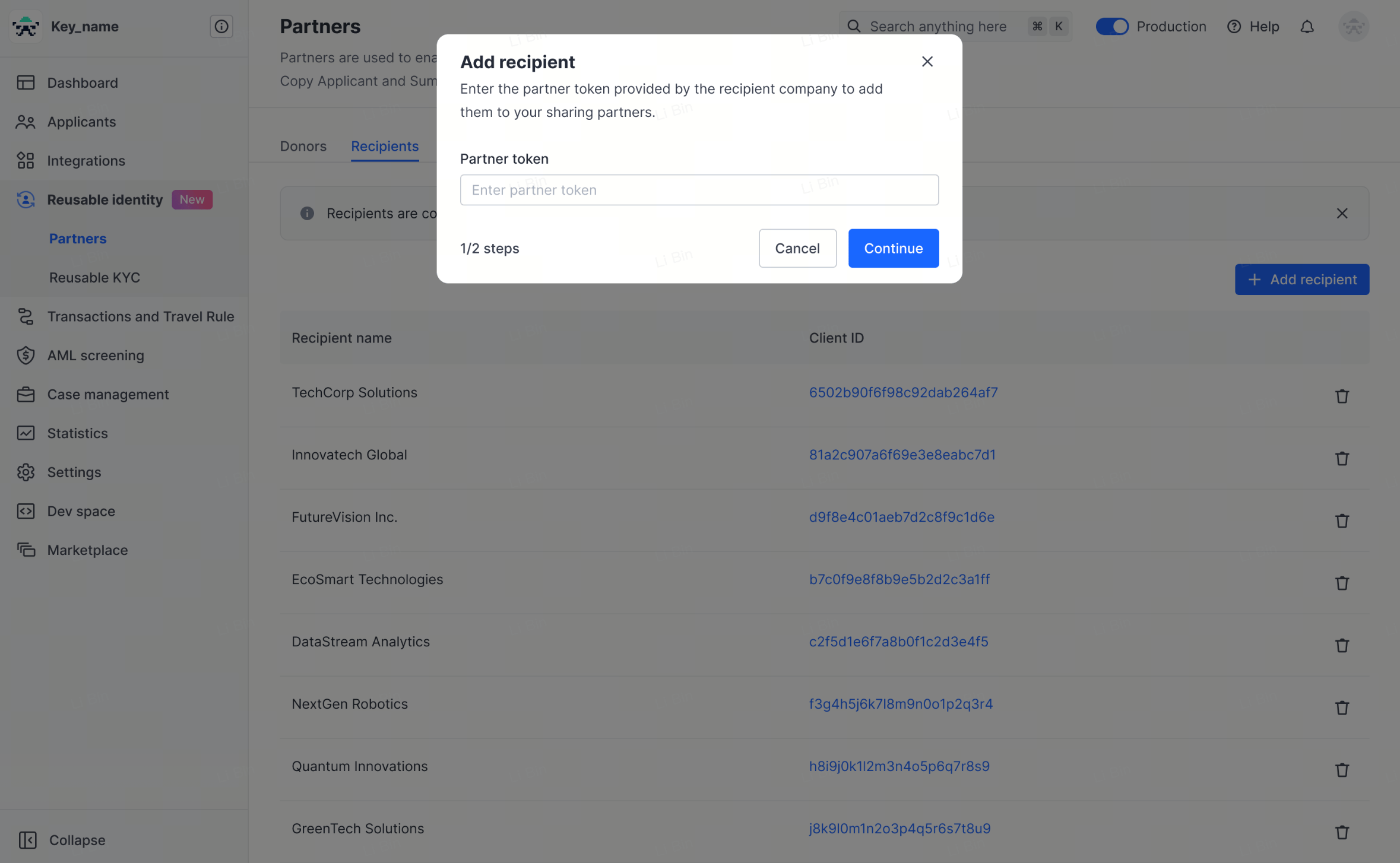 **Reference**: Sumsub's own documentation, [Manage sharing partners](https://docs.sumsub.com/docs/manage-sharing-partners)
***
## Case 2: you are the Recipient
> **Ownership**: step 1 is done by you in your own Sumsub console; in step 2, DCS adds the token and you verify the result.
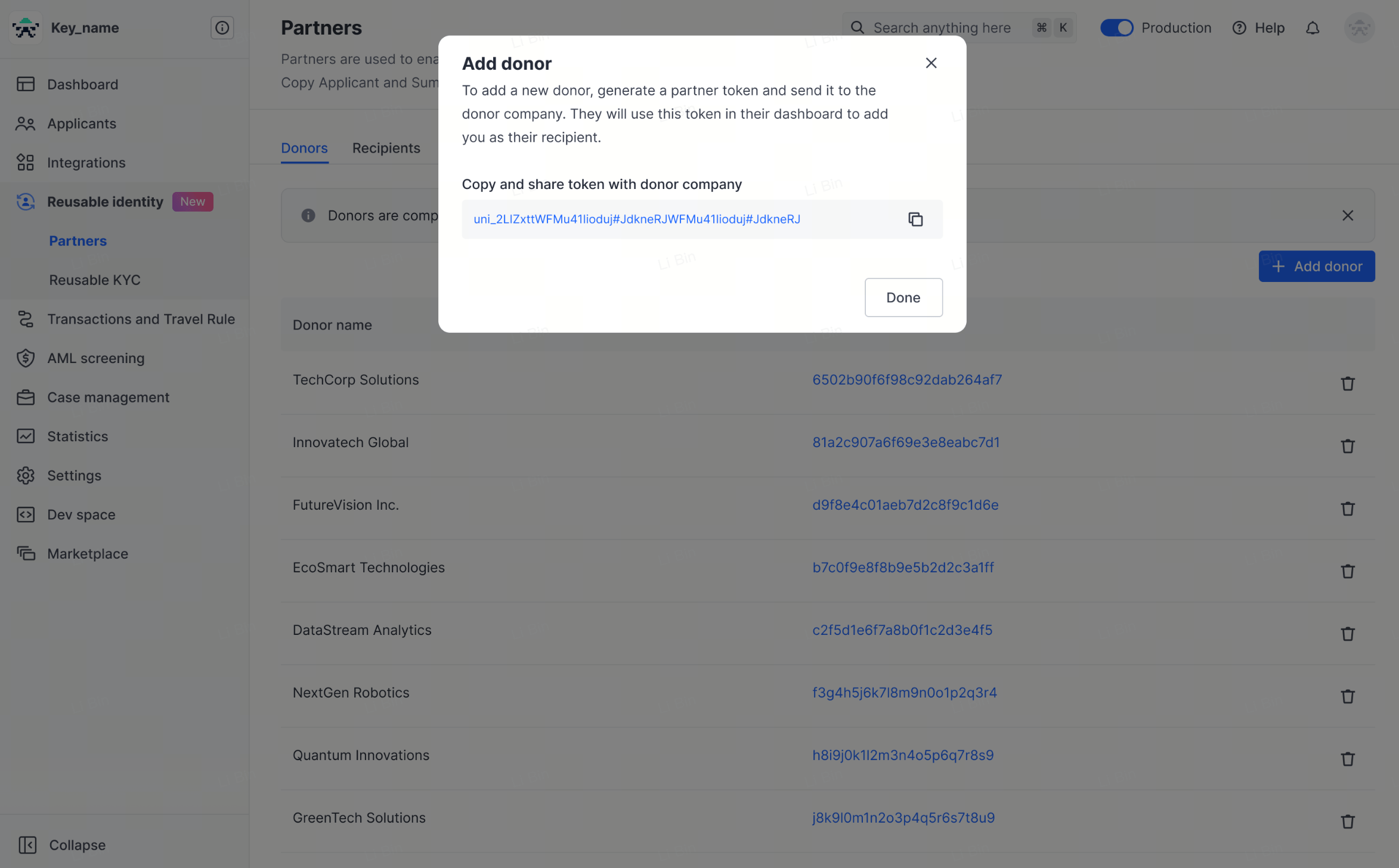
1. **Generate and hand over the tokens**: generate the **UAT** and **PROD** tokens in your Sumsub console and pass them to your DCS contact.
2. **Verify the result**: once DCS has added them, confirm that DCS appears in the **Donor list** in your own Sumsub console, and let DCS know. If it appears, the relationship is established.
**Reference**: Sumsub's own documentation, [Manage sharing partners](https://docs.sumsub.com/docs/manage-sharing-partners)
***
## Case 2: you are the Recipient
> **Ownership**: step 1 is done by you in your own Sumsub console; in step 2, DCS adds the token and you verify the result.
1. **Generate and hand over the tokens**: generate the **UAT** and **PROD** tokens in your Sumsub console and pass them to your DCS contact.
2. **Verify the result**: once DCS has added them, confirm that DCS appears in the **Donor list** in your own Sumsub console, and let DCS know. If it appears, the relationship is established.
 ***
## Frequently asked questions
**Q: Can the UAT and PROD tokens be used interchangeably?**
A: No. The two environments are isolated, so the tokens must be requested or generated separately and added separately.
**Q: Once the token is added, what else is needed before we can issue cards?**
A: The sharing relationship is only a prerequisite. For the actual KYC submission and card issuing integration, follow [Apply for KYC](../how-to-use/kyc/apply-kyc) and [Card Issuing](../how-to-use/cards/card-issuing).
**Q: What must the user's documents satisfy?**
A: See [About KYC Documents](./faq-kyc-documents) for the list of acceptable identity and address documents, validity requirements, and when an additional POA is required.
***
## The Sumsub POI / POA configuration baseline (required reading)
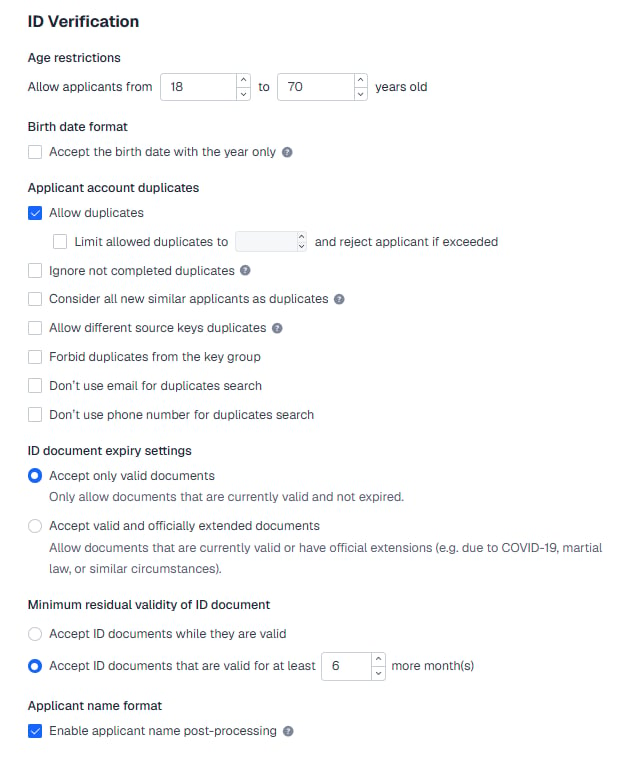
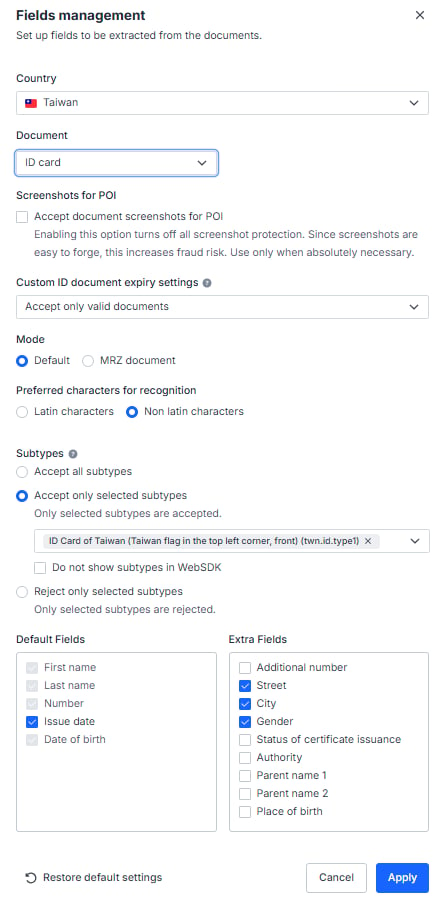
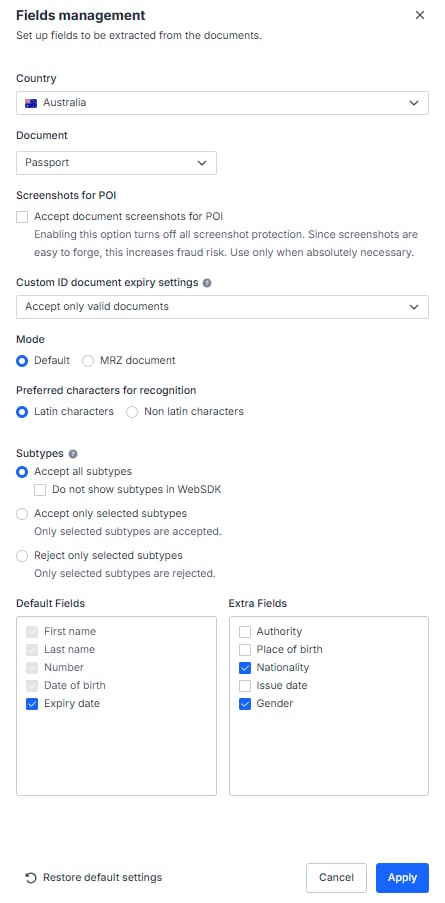
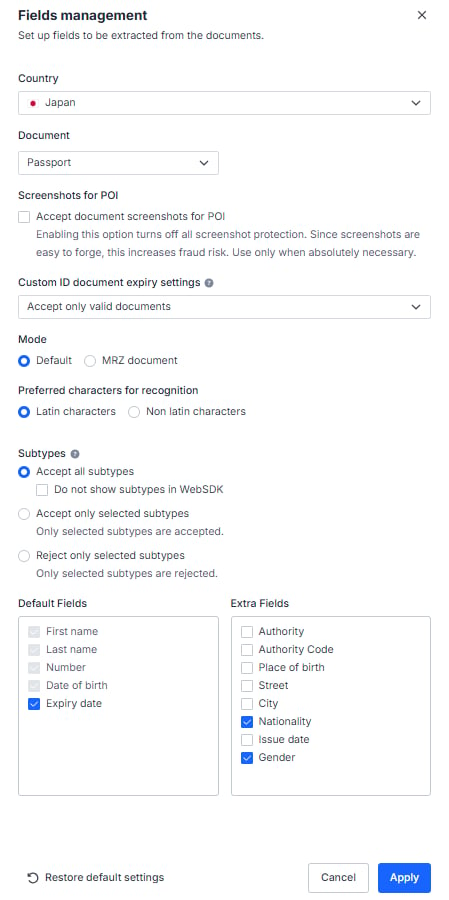
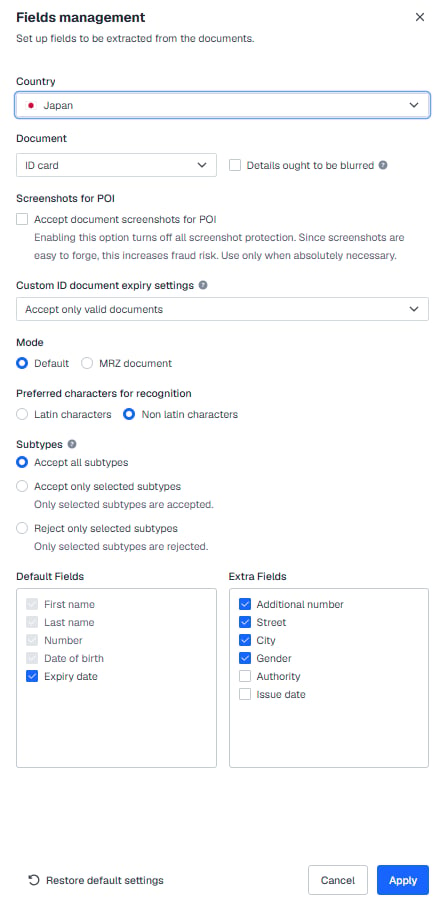
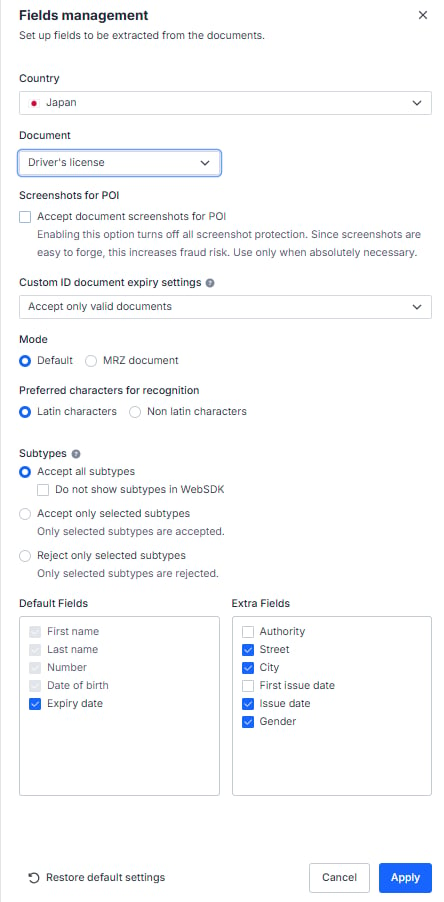
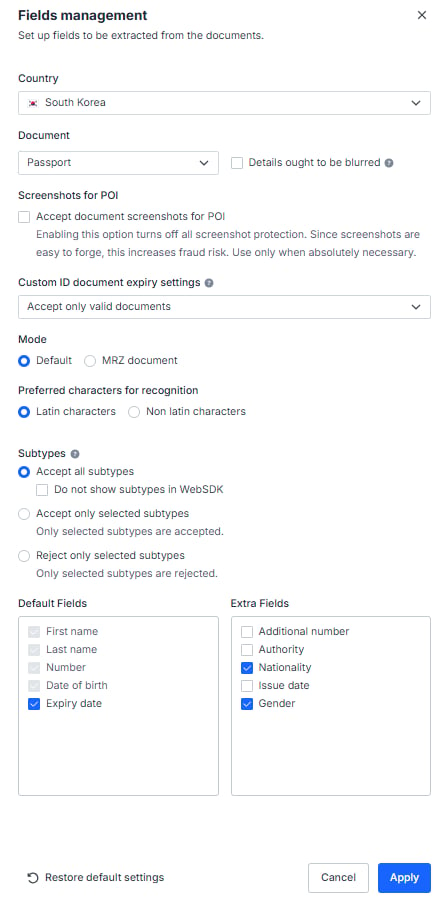
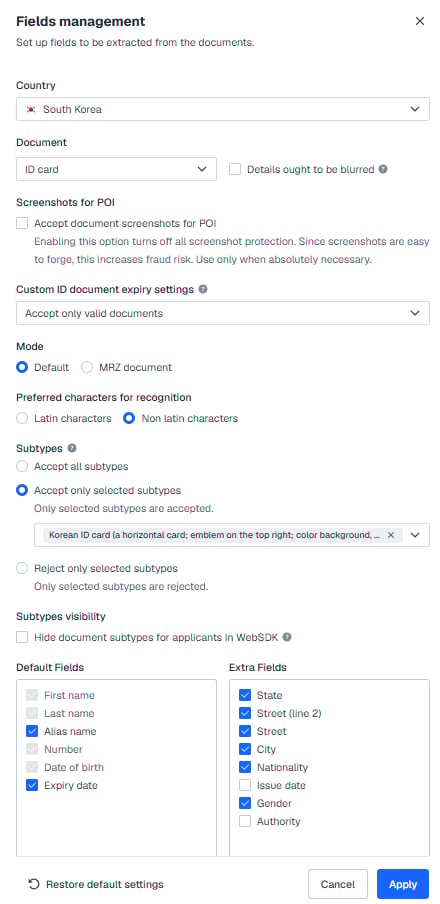
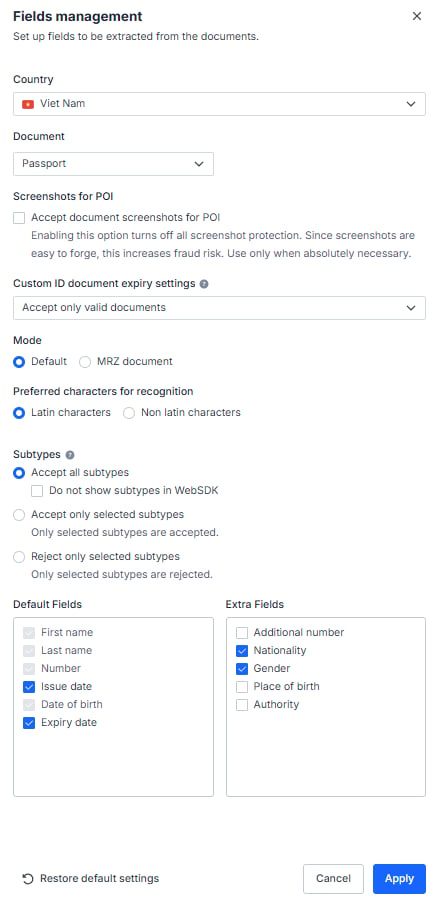
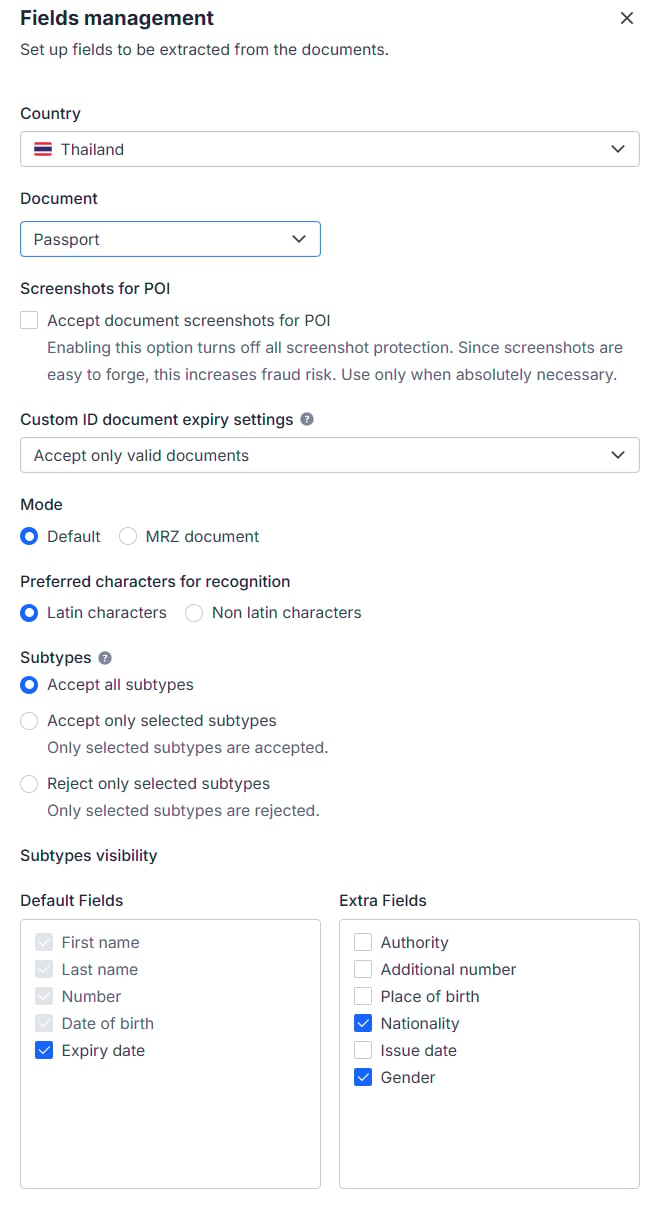
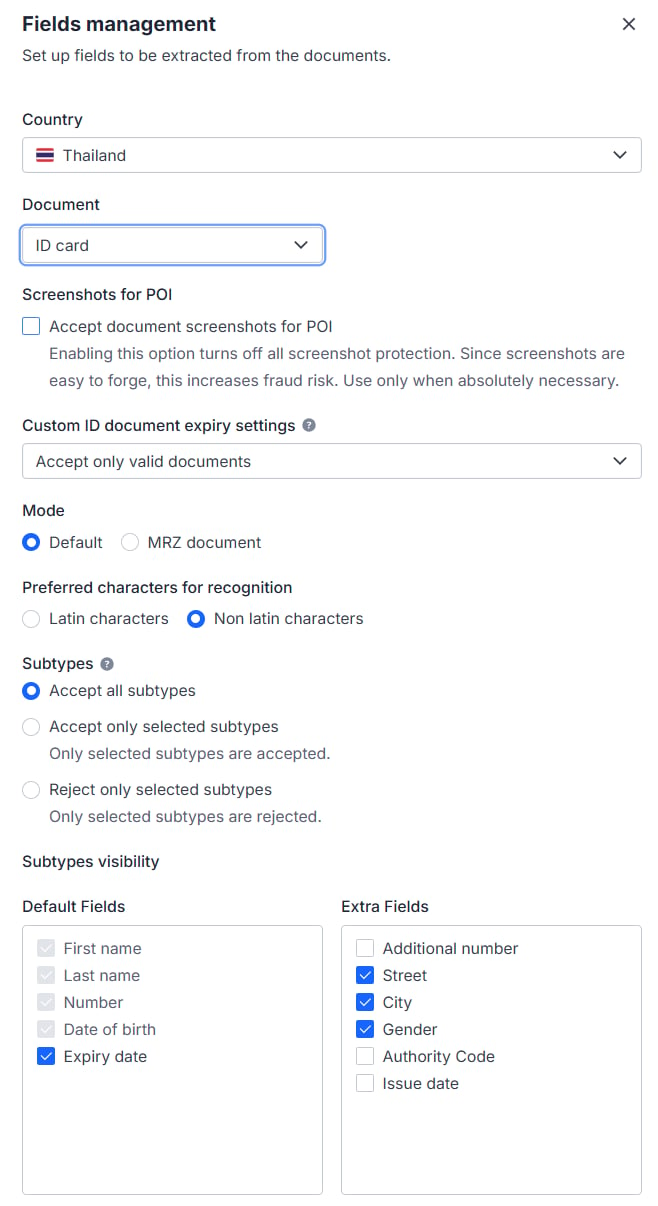
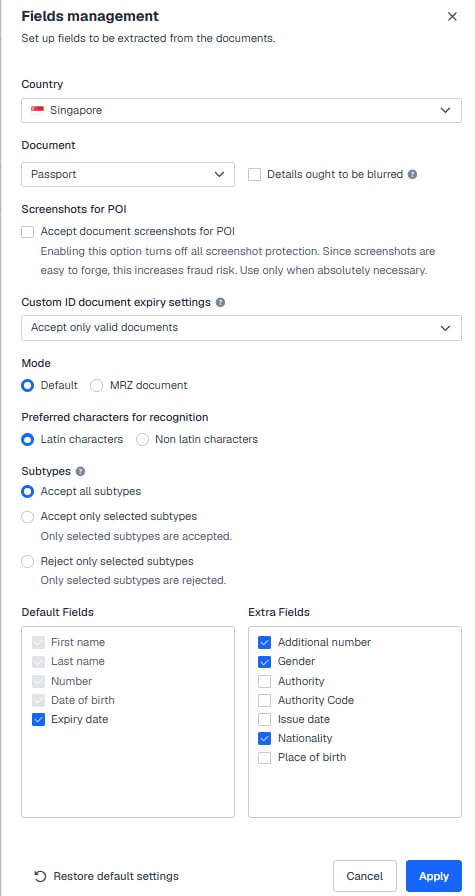
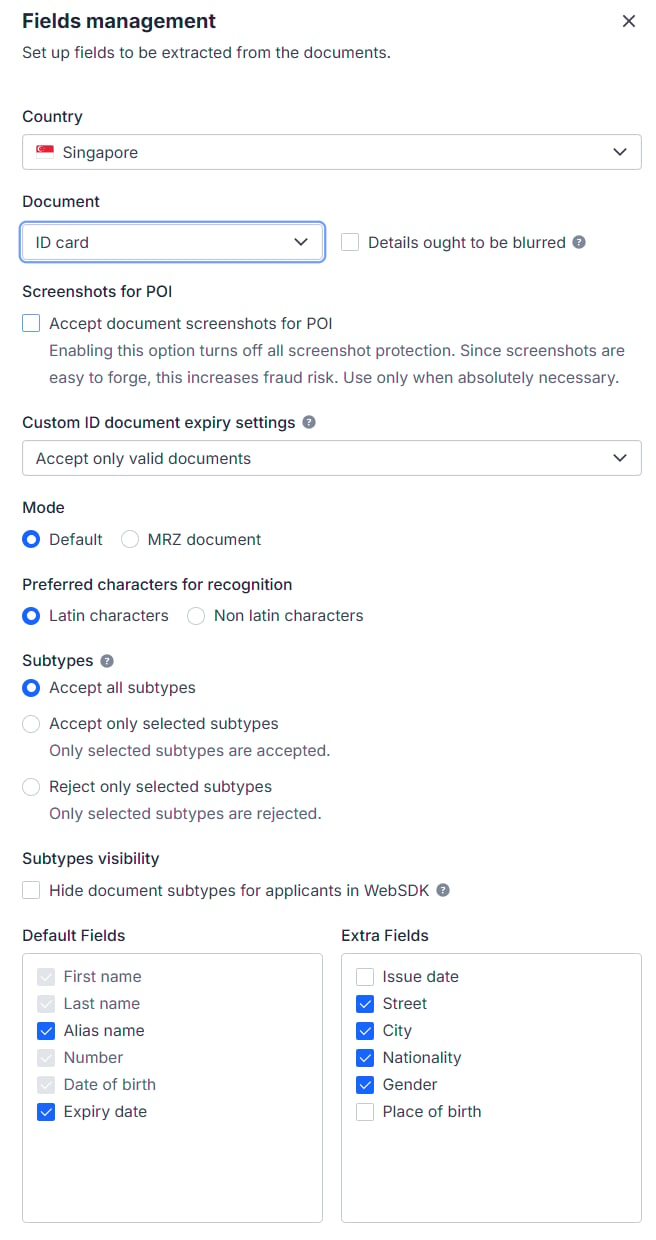
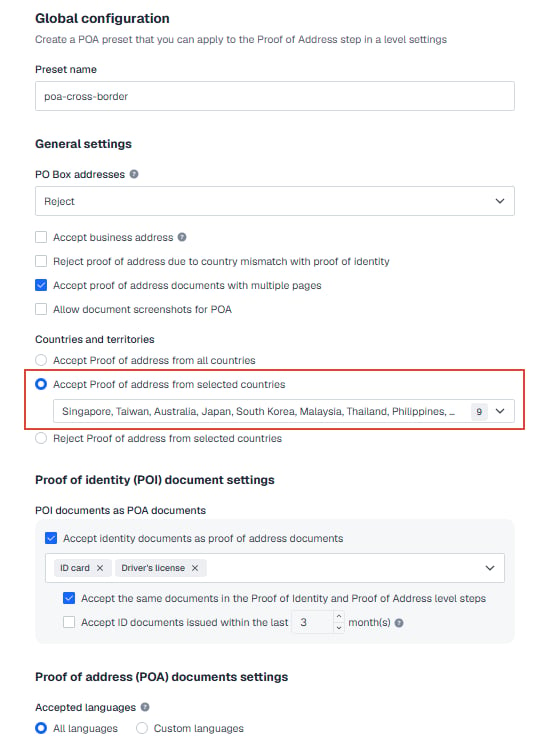
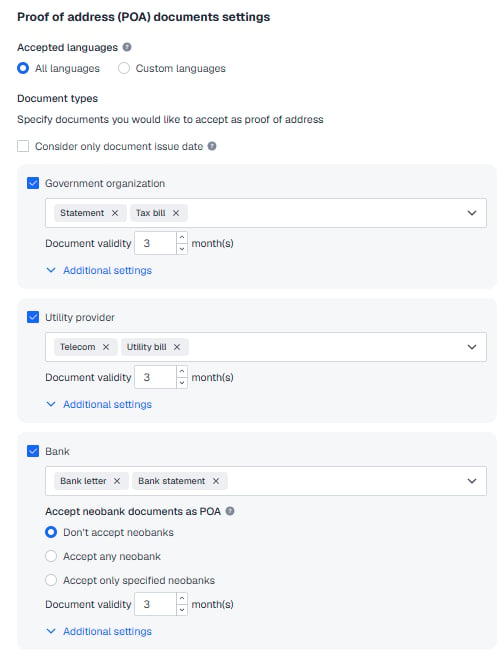
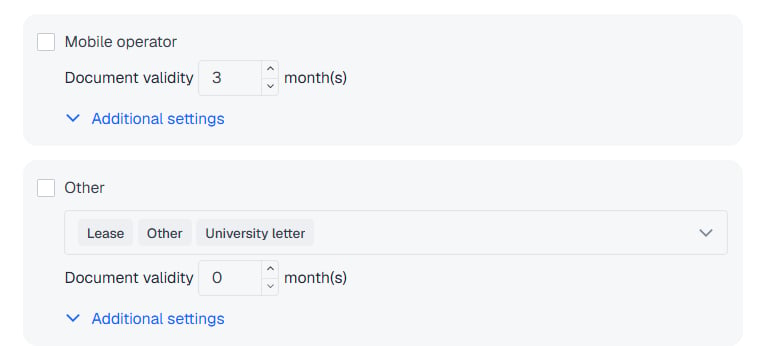
for the Sumsub token you send to DCS to pass verification, your POI (proof of identity) and POA (proof of address) configuration in the Sumsub console **must match DCS exactly**. Follow the screenshots below closely; a mismatched configuration will cause the token to fail verification and will hold up your launch.
This baseline may be adjusted from time to time as compliance or regulatory requirements change, so DCS's latest notice always prevails. For the table of accepted document types by country and when an additional POA is required, see [About KYC Documents](./faq-kyc-documents).
### Part 1: Setting for POI (proof of identity)
#### 1. ID Verification
***
## Frequently asked questions
**Q: Can the UAT and PROD tokens be used interchangeably?**
A: No. The two environments are isolated, so the tokens must be requested or generated separately and added separately.
**Q: Once the token is added, what else is needed before we can issue cards?**
A: The sharing relationship is only a prerequisite. For the actual KYC submission and card issuing integration, follow [Apply for KYC](../how-to-use/kyc/apply-kyc) and [Card Issuing](../how-to-use/cards/card-issuing).
**Q: What must the user's documents satisfy?**
A: See [About KYC Documents](./faq-kyc-documents) for the list of acceptable identity and address documents, validity requirements, and when an additional POA is required.
***
## The Sumsub POI / POA configuration baseline (required reading)
for the Sumsub token you send to DCS to pass verification, your POI (proof of identity) and POA (proof of address) configuration in the Sumsub console **must match DCS exactly**. Follow the screenshots below closely; a mismatched configuration will cause the token to fail verification and will hold up your launch.
This baseline may be adjusted from time to time as compliance or regulatory requirements change, so DCS's latest notice always prevails. For the table of accepted document types by country and when an additional POA is required, see [About KYC Documents](./faq-kyc-documents).
### Part 1: Setting for POI (proof of identity)
#### 1. ID Verification
 #### 2. Supported ID Documents
##### 2.1 Blacklisted countries (34)
None of the following documents are accepted: passport, ID card, driving license or residence permit.
#### 2. Supported ID Documents
##### 2.1 Blacklisted countries (34)
None of the following documents are accepted: passport, ID card, driving license or residence permit.
 Blacklisted countries (34): Afghanistan, Belarus, Bosnia and Herzegovina, Burundi, Central African Republic, Congo (DRC), Cuba, Guatemala, Guinea, Guinea-Bissau, Haiti, Iran, Iraq, Lebanon, Libya, Mali, Moldova, Montenegro, Myanmar, Nicaragua, Niger, North Korea, Russia, Serbia, Somalia, South Sudan, Sudan, Syria, Tunisia, Turkey, Ukraine, Venezuela, Yemen, Zimbabwe.
##### 2.2 POI accepted as POA for nine designated countries
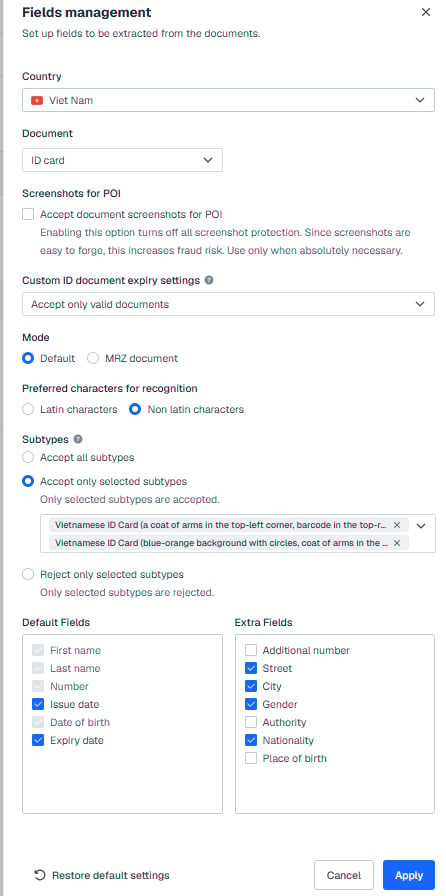
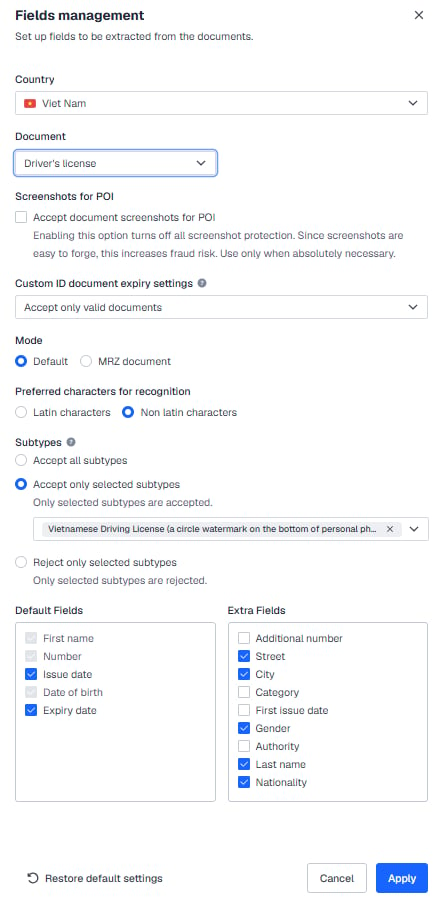
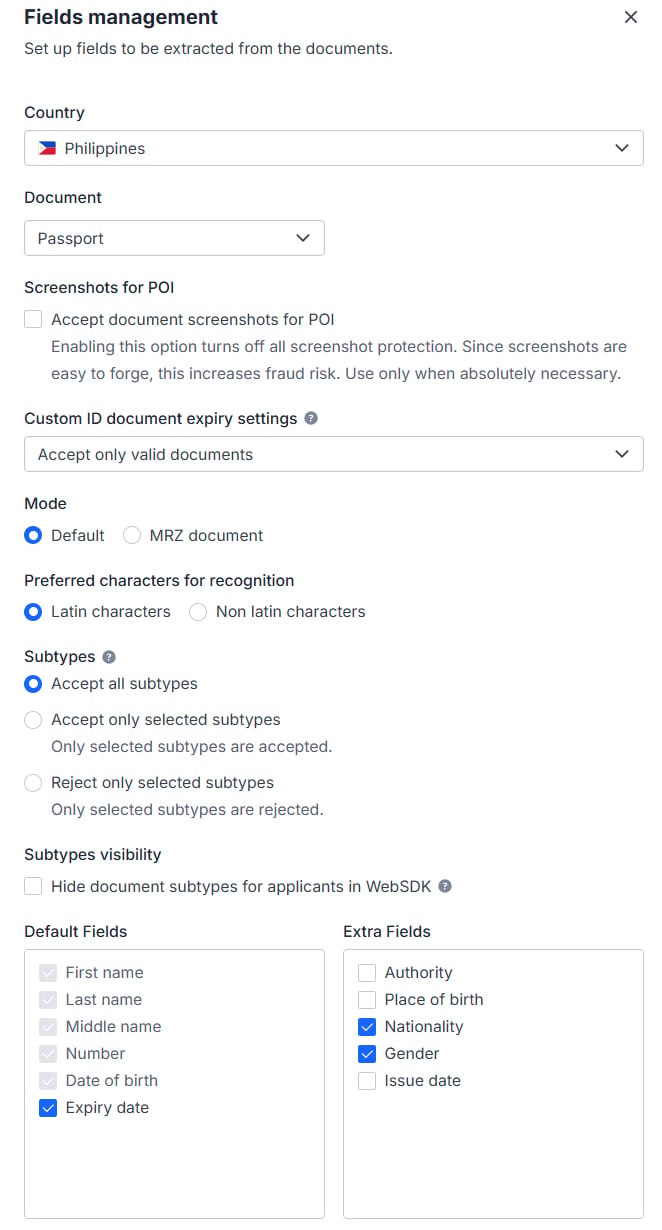
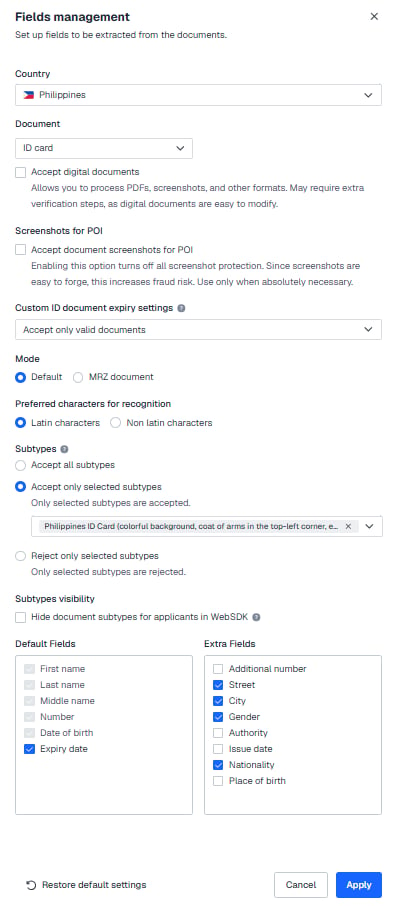
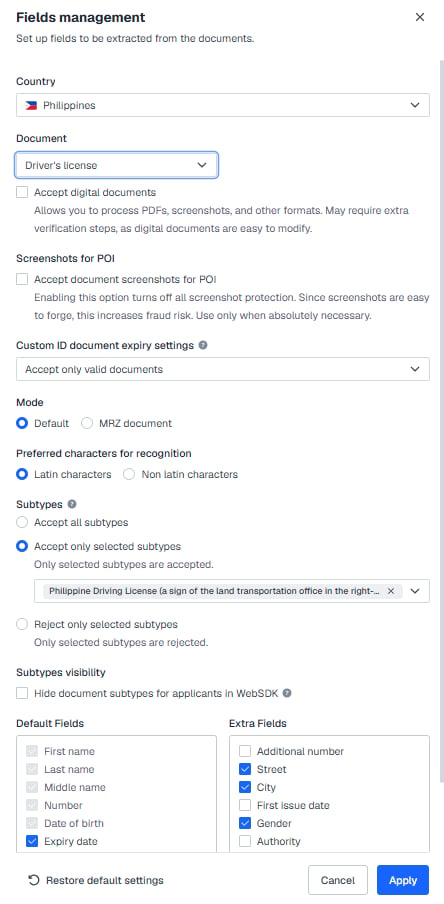
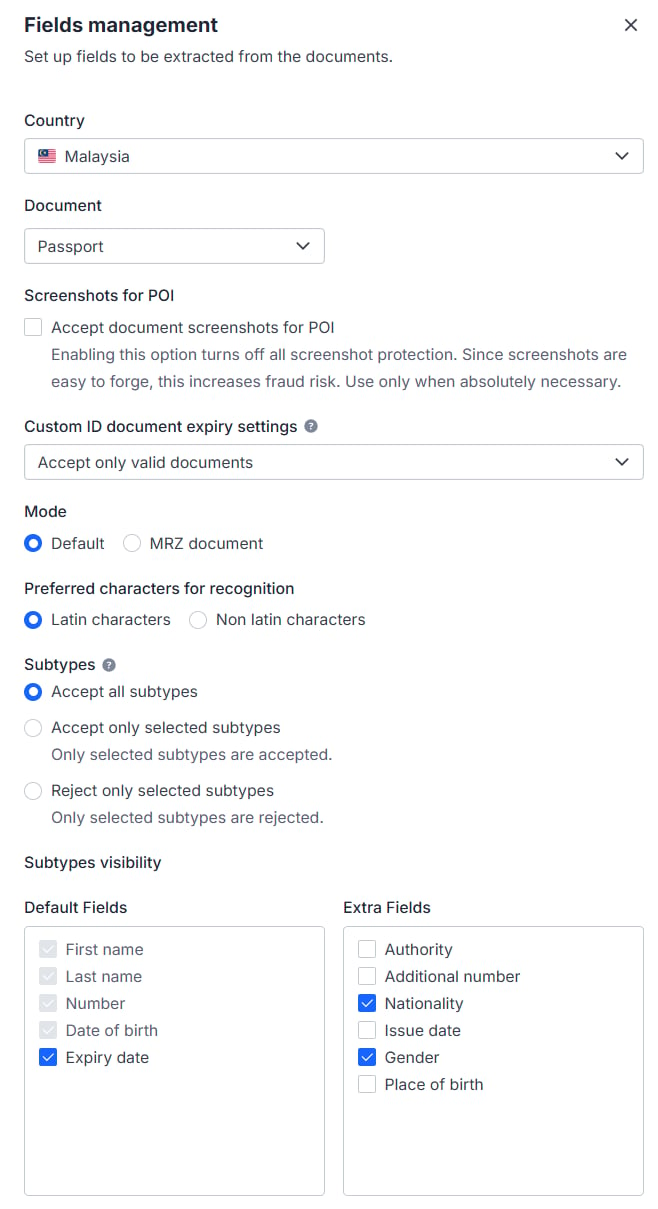
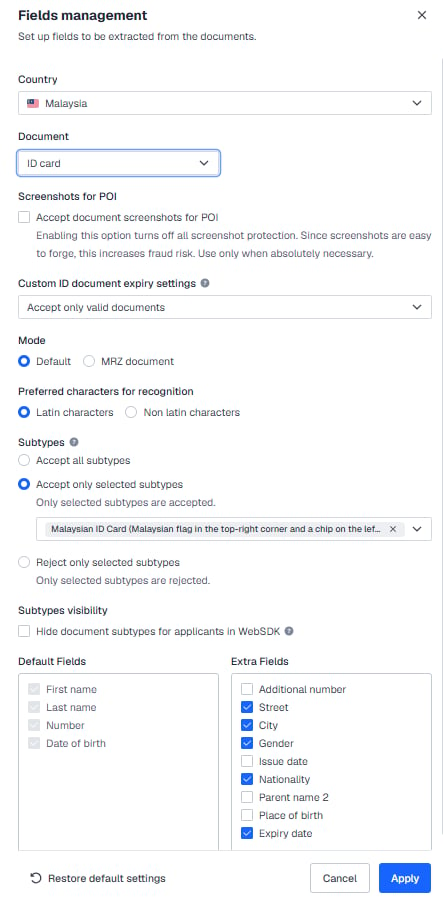
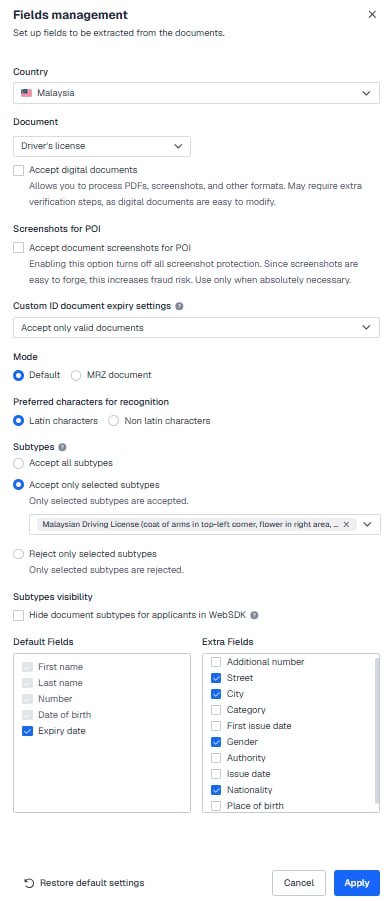
Supported countries: Taiwan, Australia, Japan, South Korea, Vietnam, the Philippines, Malaysia, Thailand and Singapore. Configure the accepted document types and subtypes for each country in Sumsub as shown in the screenshots below.
**Taiwan** — passport and ID card accepted (subtype `twn.id.type1` only)
Blacklisted countries (34): Afghanistan, Belarus, Bosnia and Herzegovina, Burundi, Central African Republic, Congo (DRC), Cuba, Guatemala, Guinea, Guinea-Bissau, Haiti, Iran, Iraq, Lebanon, Libya, Mali, Moldova, Montenegro, Myanmar, Nicaragua, Niger, North Korea, Russia, Serbia, Somalia, South Sudan, Sudan, Syria, Tunisia, Turkey, Ukraine, Venezuela, Yemen, Zimbabwe.
##### 2.2 POI accepted as POA for nine designated countries
Supported countries: Taiwan, Australia, Japan, South Korea, Vietnam, the Philippines, Malaysia, Thailand and Singapore. Configure the accepted document types and subtypes for each country in Sumsub as shown in the screenshots below.
**Taiwan** — passport and ID card accepted (subtype `twn.id.type1` only)

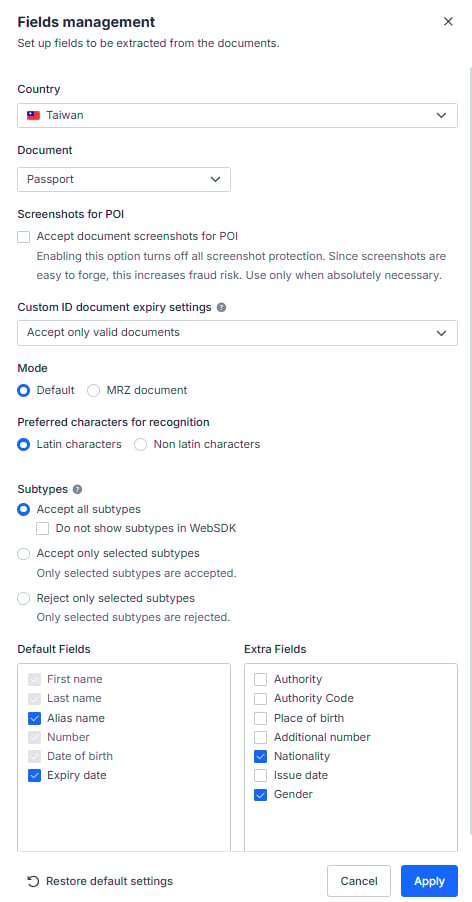
 **Australia** — passport only

 **Japan** — passport, My Number Card and driving license accepted (the IP address must be in Japan; if it is not, the user must submit a passport for verification)

 **South Korea** — passport and ID card accepted (subtype `kor.id.type1` only)

 **Vietnam** — passport, ID card (subtypes `vnm.id.type3` and `vnm.id.type4` only) and driving license (subtype `vnm.drvlic.type1` only) accepted

 **Philippines** — passport, ID card (subtype `phl.id.type11` only) and driving license (subtype `phl.drvlic.type1` only) accepted

 **Malaysia** — passport, ID card (subtype `mys.id.type1` only) and driving license (subtype `mys.drvlic.type1` only) accepted

 **Thailand** — passport and Thai National ID Card accepted

 **Singapore** — passport and Singapore identity card (NRIC) accepted

 #### 2.3 USA
 #### 2.4 Other countries
Passport only, single-sided; ID cards, driving licenses and residence permits are not accepted.
#### 2.4 Other countries
Passport only, single-sided; ID cards, driving licenses and residence permits are not accepted.
 ### Part 2: Setting for POA (proof of address)
#### 1. Workflow builder
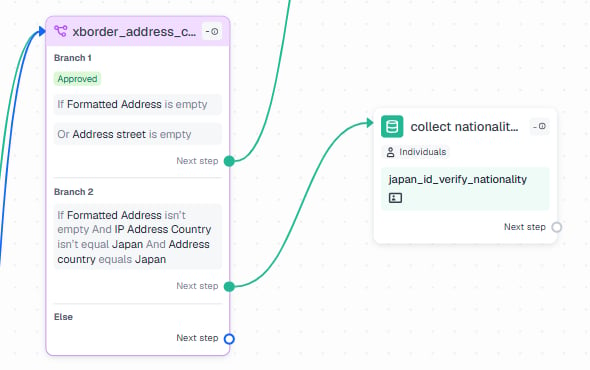
If the POI document carries no address, the user goes on to POA (proof of address) verification. If the POI document does carry an address but the address country is Japan and the user's IP is outside Japan, the user must additionally submit a passport to confirm nationality.
### Part 2: Setting for POA (proof of address)
#### 1. Workflow builder
If the POI document carries no address, the user goes on to POA (proof of address) verification. If the POI document does carry an address but the address country is Japan and the user's IP is outside Japan, the user must additionally submit a passport to confirm nationality.
 #### 2. User verification
Note: proof of address (POA) is accepted only from designated countries, as set out in your agreement with DCS.
#### 2. User verification
Note: proof of address (POA) is accepted only from designated countries, as set out in your agreement with DCS.
 #### 3. Verification level
**USA residents need to be rejected.**
#### 3. Verification level
**USA residents need to be rejected.**
 ***
## Next steps
* Accepted document types and the POA rules: [About KYC Documents](./faq-kyc-documents)
* Submitting KYC and issuing cards: [Apply for KYC](../how-to-use/kyc/apply-kyc) and [Card Issuing](../how-to-use/cards/card-issuing)
* The end-to-end verification flow: [Compliance and the KYC Flow](../basic-concepts/compliance-kyc-flow)
***
## Next steps
* Accepted document types and the POA rules: [About KYC Documents](./faq-kyc-documents)
* Submitting KYC and issuing cards: [Apply for KYC](../how-to-use/kyc/apply-kyc) and [Card Issuing](../how-to-use/cards/card-issuing)
* The end-to-end verification flow: [Compliance and the KYC Flow](../basic-concepts/compliance-kyc-flow)