
📄 Overview
A KYC ticket narrows “has this user passed KYC” down to a single application: how far it got, why it did not pass, and when a card can be issued. Tickets and card applications are two layers — first a PASSED ticket, then a card application created from it. Every state change is pushed through theKYC_TICKET webhook, and you can query detail at any time.
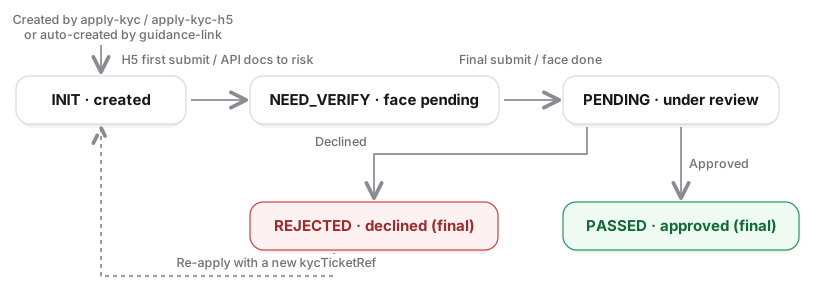
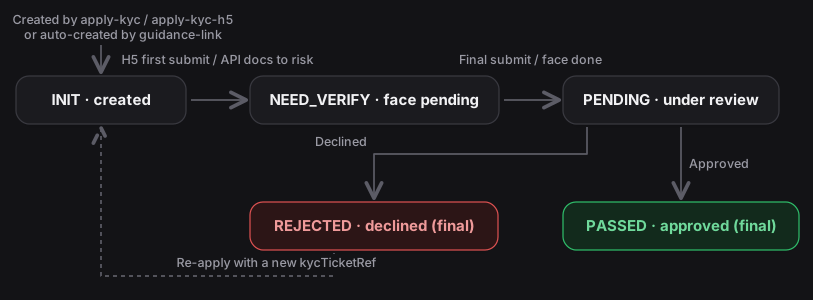
PENDING is not a mandatory state: an API-mode ticket may move straight from INIT or NEED_VERIFY to PASSED / REJECTED when the risk engine reports back. Handle whatever status you receive; do not assume states advance one step at a time.
Two application modes
Existing integrations are unaffected: calling
guidance-link (action=KYC_GUIDE) without a ticket still works and DCS reuses or creates an H5 ticket for the user when the link is issued. The ticket ID is not returned by that endpoint, but a newly created ticket triggers a KYC_TICKET webhook carrying its kycTicketId, which you can then use with detail. KYC_GUIDE does not read kycTicketId — a value passed there is ignored; to issue a link for a ticket you created yourself, use KYC_APPLY.Ticket states
Partner-initiated creation is rejected whenever the user already has any in-flight (non-final) ticket, including the H5 ticket DCS creates automatically when an
action=KYC_GUIDE link is issued; that automatic creation only looks for an in-flight H5 ticket and ignores API ones, so a user may hold both a partner-created API ticket and a DCS-created H5 ticket at the same time. The automatic ticket occupies the single in-flight slot and is never expired or reclaimed, so if the user opened a guidance link but never submitted, apply-kyc for that user keeps returning KYC_TICKET_IS_IN_PROCESSING — do not issue a KYC_GUIDE link first if you plan to use API mode. Re-creating with the same kycTicketRef: apply-kyc always returns KYC_TICKET_REF_NOT_UNIQUE (look the ticket up by kycTicketRef if a request timed out); apply-kyc-h5 returns the original ticket while it is still INIT (network-retry case), and from PENDING onwards it is rejected by status (KYC_TICKET_IS_IN_PROCESSING / KYC_TICKET_ALREADY_PASSED / KYC_TICKET_VERIFY_FAIL); a new kycTicketRef while an in-flight ticket exists returns KYC_TICKET_IS_IN_PROCESSING.
Four failure paths
API mode: encrypted career info
encryptedKycCareerInfo = Base64( AES-GCM( key = Base64Decode(SecretKey), iv = Base64Decode(iv), plaintext = the careerInfo JSON ) ) with a 128-bit tag. DCS looks up your SecretKey from the X-DAPI-API-KEY header to decrypt and never logs the plaintext. Send at least one of careerInfo / encryptedKycCareerInfo; the ciphertext wins if both are present.
Issuing a card from a ticket
Once the ticket isPASSED, call POST /card/v1/virtual-card/apply with cardApplyMode=NORMAL and kycTicketId; kycInfo is no longer needed inline. Omitting cardApplyMode means COMPLETE, identical to the previous behavior. Tickets are not bound to a card product: the KYC outcome is per user, so one PASSED ticket can back several cards of any product for that user. The apply and detail responses now include kycTicketId / cardApplyMode. See Issuing cards.
Link validity and face-page errors
- The secret in the link is single-use and valid for 300 seconds; opening the page starts a 1-hour session. Request a new link after expiry; the ticket is unaffected.
- The face page may return
PERMISSION_DENIED(link used or expired),SUMSUB_TOKEN_NOT_FOUND(session is not a face session or the ticket does not belong to the user) orKYC_TICKET_STATUS_NOT_LIVENESS(ticket already submitted or final). The first two are returned only by the face page to the browser, never in a partner API response — they are listed here to help you triage user reports.KYC_TICKET_STATUS_NOT_LIVENESSis also returned to you directly when you callguidance-linkwithaction=KYC_LIVENESSand the ticket is alreadyPENDINGor final.
Error codes
Codes are returned with the module prefix of the endpoint (e.g.CARD_KYC_TICKET_NOT_FOUND); match on the actual string. ForREJECTED, API-mode tickets carry the risk-engine codes, the same as for card applications, see the application data dictionary; H5-mode tickets useKYC_REJECTED, with the specific reason inerrorMessage, orTIMEOUTwhen the user did not finish within the Sumsub time limit — you can prompt them to start again.
Related endpoints
POST /kyc-ticket/v1/apply-kyc-h5/POST /kyc-ticket/v1/apply-kyc/GET /kyc-ticket/v1/detail: see the API referencePOST /redirect/v2/guidance-link: newkycTicketId,categoryIdandaction=KYC_APPLY/KYC_LIVENESS, see H5 guidance pagesKYC_TICKETwebhook: see Webhook & WebSocket